Frontend icon management usually follows a boring script: browse a repository, download an SVG, optimize it, add it to a sprite sheet, and deploy. That works fine for static websites or apps with fixed interfaces.
But that model breaks immediately when you build platforms that empower users to design. Think Canva, Shopify, or Prezi.
When your application needs to give users access to a searchable library of thousands of assets, maintaining your own database becomes an infrastructure nightmare. That is the specific problem the Icons8 API solves. It shifts the heavy lifting-asset management, search logic, and categorization of your backend to an external service.
For engineering leads, the decision comes down to one question: When is the external dependency worth the trade-off against self-hosted control? The answer usually depends on the scale of variety you need to offer your end users.
Scenario 1: The White-Label Website Builder
Picture a team building a niche website builder for restaurant owners. The value proposition is speed; a chef should be able to spin up a menu and a reservation site in minutes.
If the engineering team relies on a static bundle, they might include fifty generic icons: a fork, a spoon, a phone, a clock. As soon as a user wants a specific icon for “gluten-free” or “spicy,” that static library fails.
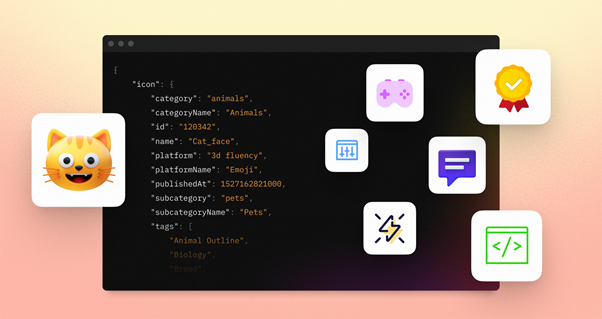
Integrate the Icons8 API, and the workflow changes. The developers build a “Select Icon” modal. When the restaurant owner types “sushi” into the search bar, the application fires a request to the Search endpoint. The API returns a JSON list of relevant icons with thumbnail URLs. These are lightweight PNGs, keeping the interface snappy even on slow connections.
Once the user selects a specific sushi roll icon, the application makes a second call-the Download call. This retrieves the high-fidelity SVG or a high-resolution PNG. The builder renders this asset directly onto the canvas. The development team doesn’t need to tag thousands of food icons or host vector files manually. They simply pipe the search query to Icons8 and render the results.
Scenario 2: Automated Content Pipelines
Let’s look at background processing rather than user interaction. Imagine a marketing automation platform designed to generate social media variations for e-commerce products.
The platform takes a product photo and needs to place it in various contexts. Here, the team uses multiple facets of the Icons8 API suite. First, they call the Background Remover API to isolate the product from its original studio shot.
Next, the system creates a lifestyle context. The Photos API lets the system programmatically search for “wooden table surface” or “summer beach background.” Simultaneously, the Upscaler API triggers if the source assets provided by the user are low resolution, stopping the final composite from looking pixelated.
Finally, the illustrations API adds vector flourishes around the product. This entire pipeline runs without a human designer opening Photoshop. The API acts as the engine for a headless design system, treating visual assets as data components manipulated by code.
A Narrative: The Search Integration Sprint
Jules, a senior frontend engineer, picks up a ticket: “Replace hardcoded icon set with live search.” The current dropdown menu is unmanageable, and the product team wants users to have full access to the library.
Jules starts by generating an API key and reading the docs. The first step isn’t the UI; it’s the proxy. Direct calls from the browser would expose the API key, so Jules spins up a simple server-side route to handle the handshake.
The first test involves sending a curl request to the search endpoint. The JSON response is massive. Simply dumping this data into the DOM will crash the browser. Jules implements a virtualization strategy for the grid view, rendering only the icons currently visible in the modal.
Next, the input field. A raw connection means every keystroke sends a request. To respect rate limits and save bandwidth, Jules adds a debounce function. The API is only queried after the user stops typing for 300 milliseconds.
Format selection is the final piece. The design team wants sharp vectors, but the marketing team warns about performance. Jules sets up the logic: fetch PNGs for the search results grid to keep it fast, but fetch the SVG vector data only when the user actually drops the icon onto the workspace. This hybrid approach balances user experience with technical constraints.
Technical Architecture and Implementation
The Icons8 platform runs on a standard REST architecture. Whether your backend is Node, Python, or Go, integration is just standard HTTP requests.
Delivery relies heavily on CDN infrastructure. Latency in an asset picker feels like a broken interface to users. If a user searches for “arrow,” the results need to appear instantly.
When you hook into the icon API, you aren’t just getting static files. You are accessing a structured database that handles synonyms and categorization. If a user searches for “trash,” the API knows to return icons labeled “bin,” “delete,” or “garbage.” Building this synonym logic from scratch is one of the most underestimated challenges in self-hosting assets.
Supported formats cover modern web development needs:
- SVG: For resolution-independent rendering and CSS styling.
- PNG: For raster contexts or legacy support.
- PDF: Often required for iOS development or print-focused applications.
Comparing Asset Strategies
You need to weigh the API approach against alternatives.
Self-Hosted Static Bundles:
If your application uses a closed set of 50-100 icons that rarely change, an API is overkill. Bundling SVGs directly into your build reduces HTTP requests and eliminates external dependencies. Switch to an API only when the variety of assets required exceeds what you can reasonably bundle.
Competitor APIs (Iconfinder, Flaticon):
Other providers offer similar search-and-retrieve functionality. Icons8 differentiates itself through the breadth of its “creative engine.” It isn’t just icons; the inclusion of the Upscaler, Background Remover, and Face Swapper APIs allows for complex image manipulation workflows within the same billing relationship. Plus, Icons8 is known for consistent icon packs (e.g., Windows 11 style, iOS style), helping developers maintain visual consistency.
Limitations and Risks
Outsourcing your asset library introduces risks that you must manage.
Network Dependency:
If the API service experiences downtime or your user has a spotty connection, your asset picker stops working. Applications need fallback states or offline caching mechanisms. Never assume the API is always available.
Rate Limiting and Cost:
While a free tier exists, it has limits. A viral spike in your application’s traffic could lead to hitting rate limits, causing the search feature to fail until the limit resets or you upgrade the plan. Enterprise-scale applications need to negotiate custom limits to prevent service interruption.
Over-fetching:
Without careful implementation, you can burn through quotas by fetching data you don’t need. Be disciplined about requesting only the specific fields and formats required for the current view.
Practical Tips for Production
Here is how to get the most out of the platform while minimizing costs and latency:
- Cache Aggressively: Search results for “settings” rarely change minute-to-minute. Implement caching on your proxy server. If User A searches for “dog,” cache that JSON response. When User B searches for “dog” ten seconds later, serve the cached result instead of hitting the Icons8 API again.
- Use Previews for Search: Never request the full-resolution or vector file for the search results grid. Use the smallest available thumbnail size. Only request the heavy file when the user commits to a selection.
- Secure Your Keys: Never embed your API key in frontend JavaScript code. Malicious actors can scrape it and use your quota. Always route requests through your own backend middleware.
- Handle Empty States: Users will inevitably search for obscure terms that yield zero results. Make sure your UI handles empty arrays gracefully, perhaps suggesting related terms or general categories.
The Icons8 API acts as a force multiplier for teams building content creation tools. It transforms a static asset library into a dynamic, searchable engine, letting developers focus on building the tool rather than drawing the assets.