

Leaving Kaspersky after 15 years of recommendation and active usage was actually a tough choice. But the new deflection tactics shown by their support, despite the lengthy support loop is making the move easier. I’ll finally quit Kaspersky for my personal devices this year and for every other device within the next few years.
A Little Background
If you’ve been a reader of 3ptechies since 2013, you must have noticed how much we loved and recommended Kaspersky products. In fact, I personally sponsored a Kaspersky Internet Security giveaway in 2017 to encourage our readers to treat the issue of system security delicately.

I first installed Kaspersky in 2010 and have been a loyal user of their internet security suite since 2011. This is more than 15 years of experience using the Kaspersky Internet Security products. While the earlier versions were heavy, affecting my PC performance, the newer models have little impact on my PC performance.
So this is going to be a short review of my recent experience with Kaspersky customer support, and exactly why I’ll be opting for another internet security product other than Kaspersky Internet Security in 2026.
What Made Kaspersky Special
Well, I could have left Kaspersky in 2022 when I noticed mixed performances, including the bug that stopped my Google Chrome and Opera browsers from being able to access the internet. Here are some of the features that make them stand out from other internet security products:
Kaspersky Safe Money
While this feature may not be popular in 2026, it was a refreshing one for early online shoppers. It opens a protected session that prevents keyloggers, spyware, and other malicious programs from being able to access what’s typed on the payment page.
Kaspersky Data Leak Checker
The data leak checker scans the dark web and other directories for compromised credentials as soon as you type your email address in a login page. It came in handy for me when working on a client’s project and apps.
Advanced Firewall and Intelligent Threat Detection
With the frequency of the threats’ database update, it is easy to sleep well knowing your devices are protected from newer threats. In fact, I relied on Kaspersky and virustotal.com to scan PHP files on clients’ websites when doing hack repair and malicious PHP files removal on clients’ websites.
Why I’m Quitting Kaspersky in 2026
Well, I had thought of leaving the product in 2022 when I noticed some persistent bugs, including the browser issue I mentioned earlier. But I was able to resolve all the challenges with guides from Reddit and the support forum.
Another hint to quit was when they were removed from the Google Play Store, but the stress of removing Kaspersky from all our computers, including those used by remote workers, was the major resistance.
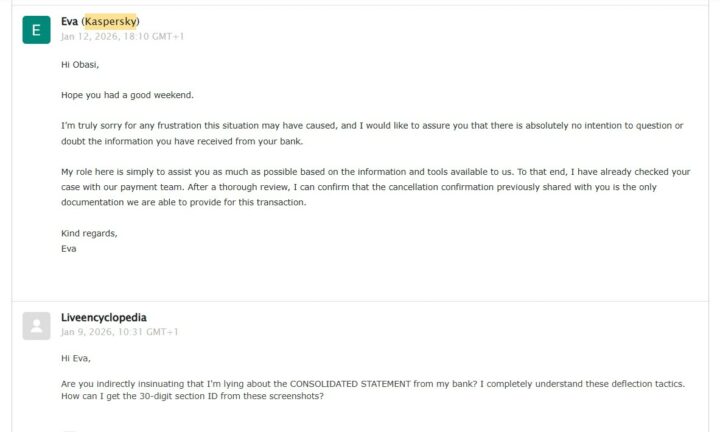 Being stressed from the first week of a new year over a problem that wasn’t originally mine was the last straw that broke the camel’s back. I not only got burned out from the support loop but also felt disappointed with the responses that always tried to shift responsibility rather than provide a resolution.
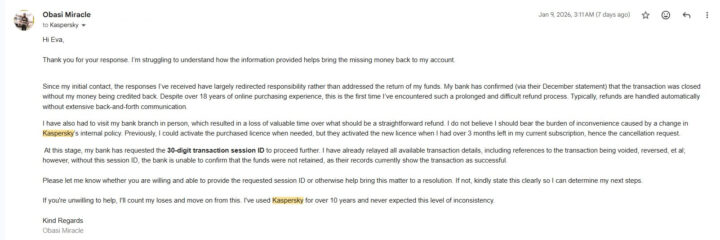
I didn’t even try to hide my disappointment with their responses, as they did nothing to return my money or issue another licence to me. Here’s a quick summary of the events that brought it to a close.
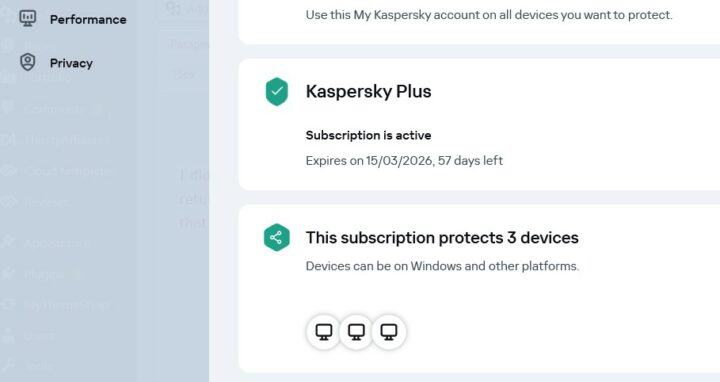
I currently use Kaspersky Plus, which is equivalent to Kaspersky Internet Security (Legacy). Before now, it was possible to stack up your next license and set it to activate once the current one expires. A change in Kaspersky’s internal policies activates the licence as soon as it’s purchased, not minding whether you currently have an active licence or not.
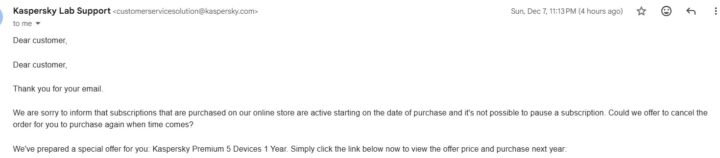
I took advantage of the usual Cyber Monday deals to buy their ultimate product (Kaspersky Premium) on December 5th, 2025, hoping to use it on my primary devices. Surprisingly, the validity period of the new licence started reducing when the current one is still active.
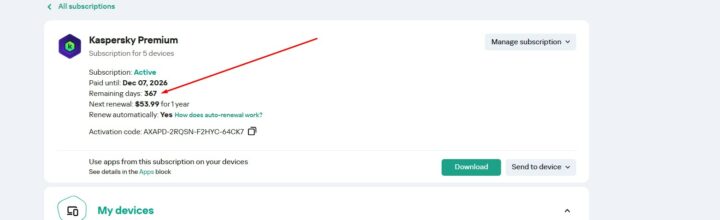
I reached out to them to help pause the subscription, so it starts counting when the current one expires. They explained it wasn’t going to be possible and suggested cancelling the new purchase and locking the deal up for me so I can buy it at the same price when my current licence expires in 3 months.
I was fine with the suggestion and asked them to proceed with that, not knowing that it was going to cause me so much wasted time and an endless support loop.
To cut a long story short, the refund never came—more than 40 days later. Support repeatedly shifted the blame to my bank, assuring me the money would appear in a consolidated statement.
In total, I had over 15 combined email exchanges with Kaspersky, called my bank more than six times, sent two follow-up emails, and even visited a local branch—all over what should have been a simple refund. Yet, none of this effort resulted in my money being returned.
The lost money itself isn’t the primary reason I’m leaving; it’s the consistent deflection tactics used throughout the entire process. Worse still, when their help actually mattered, they failed to provide the session ID my bank specifically requested.
Best Kaspersky Alternatives for 2026 Shoppers
Well, the choice is simple for me, as I already use Avast Internet Security on some of our computers and am completely satisfied with the performance. But for anyone who is shopping for a formidable Kaspersky alternative in 2026, any of these internet security products is going to be excellent:
Avast Ultimate Security Suite
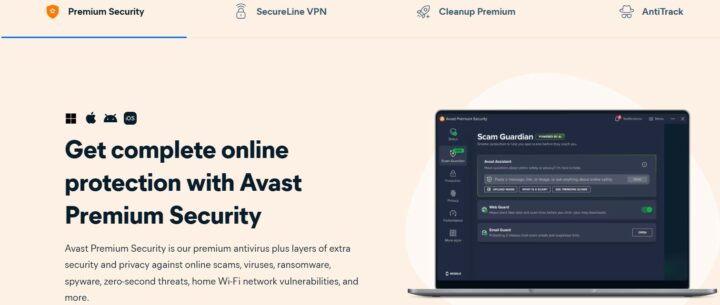
Avast Ultimate is the premier security product from Gen Digital Inc. It combines the intelligence of Avast Premium Security and SecureLine VPN to provide ultimate security and privacy for your PC and mobile devices.
Bitdefender Total Security

Bitdefender is like an old soldier in the world of security products. I used it first in 2009 before switching to other security products later on. They have continuously updated their virus engines, providing premium security, intelligent ransomware protection, and supercharged privacy/data leak protection.
Microsoft Windows Defender
If you practice safe internet habits and your PC routine doesn’t include shady apps, you’ll be just fine with Microsoft Windows Defender AntiVirus. In fact, a lot of people are fine with this setup and have been so for many years now.
You can install Malwarebytes Browser Addon to complement the free security provided by the Microsoft Windows Defender security app. It is preinstalled on all Windows computers (Windows 10 or higher) and will turn on by default if there are no other firewall or internet security products installed on the computer.
Which is Your Favorite Kaspersky Alternative in 2026?
I would like to know what antivirus program you currently use, or which internet security product you’d recommend for someone looking for a Kaspersky alternative in 2026. Share the same with us by using the comment box below.
















I find your internet security recommendations valuable. Thanks for sharing
Interesting read! Your experience with Kaspersky is really insightful! Thanks for sharing the reasons behind your switch.
I use TotalAV and am completely satisfied with how well it works on both my computer and phone.