 Here’s a quick comparison of Kling 2.6 API and Sora 2 API by Kie.ai, detailing their features, strengths, capabilities, and how they can serve as your GO-TO API for AI Video Generation in 2026.
The growing demand for scalable, high-quality video content is pushing companies and platforms to adopt AI video generation at the infrastructure level. Rather than relying solely on consumer-facing AI video generators, businesses are increasingly integrating video generation capabilities directly into their products and workflows through APIs.
Among the many AI video generation APIs available today, the Kling 2.6 API has drawn attention for its approach to synchronized audio and visual output. This article compares
Kling 2.6 API with other leading AI video generation APIs, including Sora 2 API, focusing on their core capabilities, integration flexibility, and overall value for enterprises and developers building AI-powered video products.
Kling 2.6 API Features: High-Definition Video and Audio Synchronization
Synchronized Audio and Visuals
Kling 2.6 API allows users to generate visuals, voiceovers, and sound effects simultaneously, making the video creation process seamless. Whether you’re inputting text or images, the system automatically handles both audio and visual details, creating a fully immersive video experience.
Full Control Over Audio
With Kling 2.6 API, creators can control every aspect of the audio. This includes choosing the speaker, defining the speech’s emotion, and customizing sound effects and background noise. The system can also adjust the pacing and rhythm, providing flexibility for a wide range of creative needs.
Effortless Creation with Text or Images
No complex operations are required with Kling 2.6 API. Simply input text or images, and the system generates the video with synchronized audio and visuals. This ease of use makes it an ideal choice for creators and businesses looking to streamline their video production.
High-Quality Audio Output
Kling 2.6 API supports various sound types, including voice narration, environmental sounds, and special effects. The audio quality is crystal-clear, with layered sounds that mimic real mixing effects, making your videos sound as professional as they look.
Semantic Understanding of Text and Speech
The Kling 2.6 API has strong semantic capabilities, allowing it to understand complex text descriptions and spoken language. This ensures that the generated content accurately reflects the creator’s intentions and is appropriate for the given context.
Sora 2 API Features: Realism and Creative Flexibility
Synchronized Audio and Complex Soundscapes
Sora 2 API supports the creation of realistic soundscapes, including complex background sounds, voiceovers, and sound effects, all synced perfectly with the video content. This capability enables creators to produce rich, immersive audio-visual experiences.
Physical Laws Compliance
Unlike earlier models, Sora 2 API ensures that the objects in videos follow the physical laws, avoiding unrealistic distortions. This results in a more believable and accurate visual representation, whether you’re working with realistic, cinematic, or animated styles.
Control Over Complex Multi-Shot Scenes
Sora 2 API allows for precise execution of complex instructions across multiple camera angles and shots, maintaining consistent world state throughout the video. This feature is particularly beneficial for projects that require detailed scene continuity and precise transitions.
Realistic Visual Styles and Cameos
Sora 2 API excels at generating realistic visuals across various styles, including cinematic, realistic, and anime styles. It also introduces a unique cameo feature, allowing users to create highly accurate depictions of themselves in videos by simply uploading a short audio or video clip. This feature ensures true-to-life likenesses with impressive fidelity.
How to Choose the AI Video Generation API: Kling 2.6 API or Sora 2 API?
Kling 2.6 API: Seamless Audio-Visual Integration and Ease of Use
Kling 2.6 API is designed for creators who need quick, high-quality video generation. It offers a seamless integration of audio and video, where both elements are generated simultaneously.
With the Kling 2.6 API, you simply input text or images, and the system automatically handles the generation of voiceovers, sound effects, and visuals. It provides full control over audio customization, allowing creators to adjust the emotion, speed, and even background sounds.
Sora 2 API: Realism and Creative Flexibility
Sora 2 API stands out for its ability to create realistic videos with highly detailed visual styles. Whether you’re producing realistic, cinematic, or anime-style content, Sora 2 API excels in providing photo-realistic rendering and ensuring objects in videos follow physical laws.
This API is perfect for projects that require realism or complex interactions across multiple shots. If you need advanced capabilities for creating highly detailed and stylistically flexible videos, Sora 2 API offers the most versatile solution.
Why Choose Kie.ai to Integrate AI Video Generation API
Affordable Pricing for High-Quality Video Generation
One of the biggest advantages of Kie.ai is its affordable pricing. Whether you’re creating a 5-second video with or without audio, the rates are budget-friendly, Kling 2.6 API pricing, starting at just $0.28 for 5 seconds without audio and $0.55 for 5 seconds with audio.
In comparison, Kie.ai’s Sora 2 Pro also offers competitive pricing, with the standard version priced at $0.75 per 10 seconds and $1.35 for 15 seconds. The premium version costs $1.65 per 10 seconds and $3.15 for 15 seconds. Despite these costs, Sora 2 Pro remains more affordable by 58-75% compared to official prices and provides all videos without watermarks.
Comprehensive API Documentation and Technical Support
Kie.ai offers detailed API documentation for Kling 2.6 API and Sora 2 API, ensuring users can easily integrate the tool into their projects. Whether you’re a beginner or a developer with more experience, the clear and comprehensive guides make it simple to get started.
Additionally, Kie.ai provides top-notch technical support to help you with any challenges you may face, ensuring that you can focus on creating high-quality video content without worrying about technical obstacles.
API Key Management and Restrictions API
When using Kie.ai’s Kling 2.6 API, the platform provides secure API key management, ensuring that your API key is kept private and protected. However, it’s important to note that Kie.ai has whitelisting and usage limitations for API keys.
These measures ensure that your account remains secure and that API usage adheres to the platform’s best practices, preventing misuse. By offering these restrictions, Kie.ai enhances security and optimizes the performance of its services, offering peace of mind for both small businesses and large enterprises.
How to Integrate Kling 2.6 API by Kie.ai: A Step-by-Step Guide
Step 1: Obtain Your Kling 2.6 API Key
To start using the Kling 2.6 API, the first step is to obtain your API key. Once you sign up for an account with Kie.ai, you’ll receive a unique Kling 2.6 API key. This Kling 2.6 API key will be used to authenticate your requests and ensure secure communication between your application and the Kling 2.6 API.
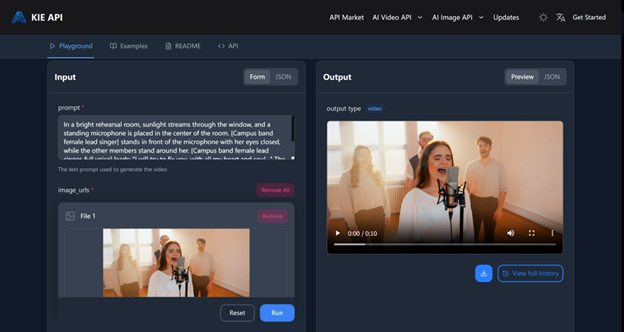
Step 2: Create a Task via POST Request
After obtaining your Kling 2.6 API key, you can create a video generation task by sending a POST request to the Kling 2.6 API. In this request, you’ll need to specify the model you want to use and provide the input parameters, such as the text prompt or image URLs.
Additionally, you can define the video duration and specify whether you want the video to include audio. You also have the option to add a callback URL to receive notifications once the task is completed.
Step 3: Monitor Task Status with a GET Request
Once the task is created, you can track its progress by sending a GET request to check the task status. The response will indicate whether the task is still waiting, in queue, generating, or if it has been completed successfully. If the task has failed, you will receive an error message to help you troubleshoot.
Step 4: Retrieve the Generated Video
Once the task completes successfully, you can retrieve the generated video by accessing the result URLs provided in the response.
These URLs link to the video content, which you can download or display in your application. If there are any issues, the failure message will guide you in making the necessary adjustments.
Which AI Video Generation API is Right for You?
As the demand for high-quality, engaging video content continues to grow, choosing the right AI video generator API becomes essential for businesses and creators. The Kling 2.6 API and Sora 2 API all offer unique features tailored to different video production needs.
Whether you’re focused on seamless audio-visual integration, high-definition video quality, or realistic soundscapes, each API provides valuable capabilities that can enhance your video creation process. Ultimately, the best choice depends on your specific requirements, from ease of use and customization to cost and video output quality.