Last year, my brother-in-law drove six hours to photograph a black bear trail in Montana. He had been planning the trip for months. He readied his extra camera, memory cards, batteries, and had a full charge on his DSLR. He came back with over 800 shots. Two days later, he tried to transfer the files, and the card threw an error. The camera would no longer read it. Every single photo was gone.
He called me because I am the person in the family who “knows about storage.” I did not have an answer for him that day. But the incident sent me into learning how digital cameras actually store data, where things go wrong, and why a small camera device can cause problems that are anything but small.
The Size of the Camera Has Nothing to Do With Photo Loss
Most people look at a DSLR or a mirrorless camera and think these are just cameras, but inside, they work like a supercomputer. It runs its own little file system, writes data constantly, manages folders, creates thumbnails, and logs metadata, all on a tiny piece of removable storage.
That removable storage, usually an SD card, MMC card, or a CFexpress card, is where things may get fragile. These cards are built to be fast and compact. What they are not built for is surviving every situation you put them through. Heat in a car, a little moisture near a waterfall, a static charge from pulling the card too quickly, or simply reaching the end of their write cycle. All of it adds up.
The camera body can also hold data temporarily in its buffer before writing to the card. If the battery dies mid-process, that data can get corrupted. A lot of photographers have no idea this is possible until it happens to them.
Why DSLRs Carry Photo Loss Risk
Point-and-shoot cameras and smartphones automatically back up your photos. Most of them sync to the cloud when you connect to Wi-Fi. Sadly, DSLR and mirrorless cameras do not work this way.
With Professional and semi-professional cameras, you get the freedom to choose when to shoot, how to shoot, and also when and how to move your files. However, it also means that there is no safety net operating in the background.
A wedding photographer who shoots in RAW will fill up a 64GB card in one ceremony. These files are huge, sometimes 25 to 40 megabytes each, all sitting on one card with no backup until the photographer gets home. A lot of things can happen in between.
Formatting a card by accident is more common than people admit. Pressing the wrong button in a menu, giving the camera to someone who doesn’t know how to handle it, or just moving too fast in a busy setting. One wrong click and the card is formatted.
The File System is a Powerhouse
When your DSLR writes a picture, it doesn’t simply add a file to the card. It also writes to a file allocation table, enters the file name, writes the picture data in chunks, and closes the file. If anything goes wrong during this process, the file can become corrupted or unreadable.
Cards that have been used for a long time start developing bad sectors. These are small areas that are no longer capable of holding data. The camera continues to write to these areas anyway because it doesn’t always recognize the issue right away. By the time you notice, several files can already be corrupted.
Burst shooting will make this problem worse. When you’re shooting fast, you’re pushing the write speed of the card to its absolute limit. Cheap cards that aren’t designed for fast write speeds can begin to lose data in the middle of a burst shoot without warning.
Situations Where Photographers Lose Photos
Sometimes a camera or SD card failure is subtle and gradual. A travel photographer I know took three weeks to shoot all over Japan. She formatted her cards in her camera after each transfer, thinking she was being efficient.
One night, she discovered her transfer software had been malfunctioning for days, transferring only partial files with no error message. The originals were lost because she had deleted them.
Cheap card readers are a different problem altogether. A faulty USB card reader can write bad data back to the card during a transfer. This is usually blamed on the camera or the card, when in fact the reader is at fault.
Cold weather is yet another hazard. In freezing temperatures, the electrical contacts inside a camera and on a memory card can act erratically. Data transferred in cold conditions sometimes does not verify properly when warmed up to a different location.
What Actually Happens to the Photos When They Disappear?
When a photo gets deleted or a card gets formatted, the image does not vanish right away. The camera marks that space as available and moves on. The actual image data usually stays put until new photos are written over it.
This is the moment that matters. The faster you stop using the card after a loss, the better your chances. Every new photo you take chips away at that window.
That is where a tool like Stellar Photo Recovery comes in. It is software you run on a Windows or Mac computer. You connect the memory card, run a scan, and the software looks for photos and videos that are no longer visible but have not yet been overwritten. It works with RAW files, JPEGs, videos, and most formats that DSLRs and mirrorless cameras produce.
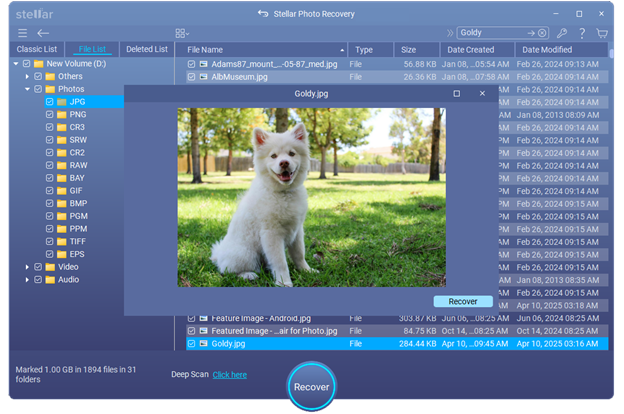
My brother-in-law used it, and he was able to recover about 90 percent of his photos from the SD card that his camera had stopped recognizing. That’s because he stopped shooting on that card the moment he noticed the problem.
What You Can Do to Lower the Risk of Photo Loss?
To avoid such instances, using two cards simultaneously is the simplest practice, only if your camera allows it. Dual card slots are common on mid-range and professional DSLR cameras. Designate one slot for backup and the other for primary storage.
Transfer your files as soon as you are done shooting. Do not leave full cards in a bag for days after. Once verified, make a secondary copy on an external drive. It adds five minutes to your post-shoot routine and has prevented many photographers from having a very bad day.
Budget memory cards are one area where cost cuts often come back to bite you in the end. Use memory cards from trusted manufacturers that are tested for the write speeds your camera actually supports.
The Camera Is Small, But What It Carries Is Not
The physical size of the device has nothing to do with the value of what is stored on it. Most data risks with digital cameras come down to habits and assumptions, not rare technical failures. Knowing how the storage works, where the weak points are, and what to do when something goes wrong can avoid total data loss.