

There is no shortage of AI photo apps on mobile right now, but many of them promise the same thing: sharper selfies, smoother skin, prettier portraits, and one-tap enhancements that often feel more cosmetic than useful.
Wondershare Relumi takes a more specific route. Instead of presenting itself as just another general AI photo enhancer, it makes a clearer promise around one practical use case: AI Photo Retake for photos that almost came out right, but still need help before people feel happy keeping or sharing them.
That positioning matters because it is immediately relatable. Some photos are not bad enough to delete, but they are not good enough to keep without hesitation either. A blink ruins the timing. A stiff expression weakens the shot. The lighting feels flatter than the real moment did. The angle is technically acceptable, but the result still feels slightly off.
Those are exactly the moments people often want to save, because the memory matters more than the flaw. That is where Relumi‘s AI Photo Retake positioning becomes stronger than a generic “AI photo enhancer” pitch. The app is not mainly about beautifying images. It is about making photos worth keeping more usable, more natural, and more worth keeping.
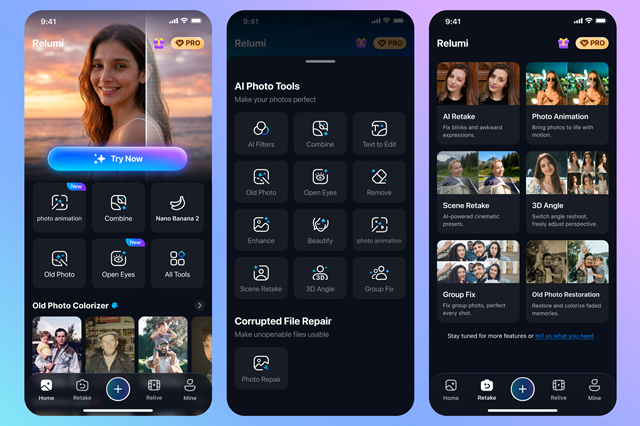
What Relumi Does Best
Relumi is built around portrait correction, scene enhancement, and light creative tools for memory-focused photo use, but the product identity becomes much clearer when everything is framed under one headline idea: helping users retake a photo with AI after the original moment has already passed.
The app includes tools for correcting closed eyes, improving awkward expressions, adjusting lighting, repairing group photos, refining portrait perspective, restoring older images, and turning still images into short animated clips. On paper, that sounds like a wide feature list, but the features connect more convincingly when they are read as extensions of AI Photo Retake rather than as unrelated AI tricks.
That gives Relumi a clearer identity than many mobile editors. It is not trying to be a professional editing suite, and it is not only chasing beauty-filter trends either. It sits in a more practical middle ground: a convenience-first AI photo app for people who want a better version of a real moment.
AI Photo Retake Is the Main Reason to Care
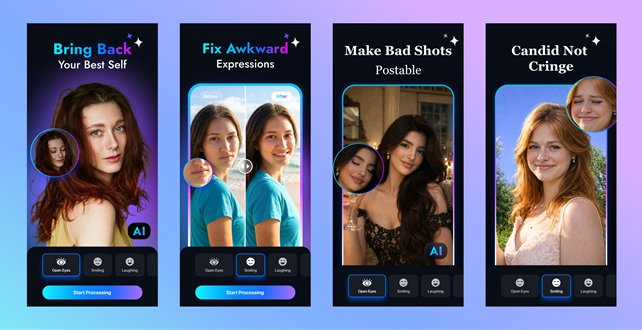
The strongest feature in Relumi is AI Photo Retake, especially for portraits. This is also the feature that most clearly differentiates Relumi from more generic AI photo apps.
Closed eyes remain one of the most common ways a good image gets ruined. It happens in travel photos, family pictures, event shots, and casual selfies. One blink is enough to make an otherwise strong image feel unusable, especially when the moment cannot be recreated.
Relumi’s appeal is that it tries to correct issues like closed eyes or slightly awkward expressions while still keeping the original mood of the image intact. That difference matters. Many AI tools can generate a cleaner-looking face, but fewer feel genuinely useful unless the result still looks like the same person in the same moment.
For readers searching for a practical app to fix closed eyes in photos, improve a portrait, or save a meaningful image without overediting it, AI Photo Retake is easily the app’s most compelling feature — and the clearest expression of what Relumi is for.
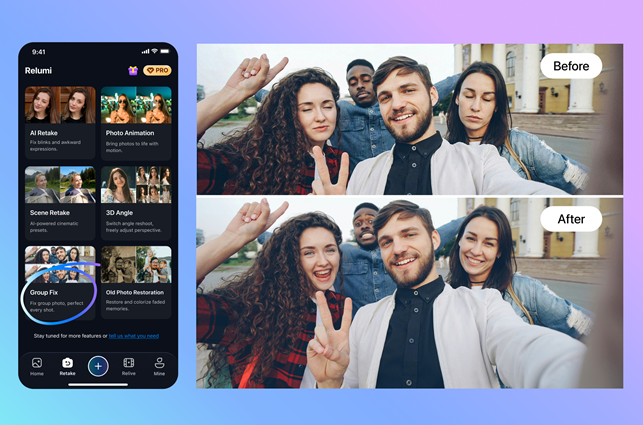
Group Photo Repair Adds Real Everyday Value
Where Relumi becomes more broadly useful than a standard portrait app is in its group photo repair feature. This is one of those tools that sounds simple until you think about how often it would actually be needed.
Group photos are notoriously difficult to get right. Someone always blinks, looks away, or ends up mid-expression. In weddings, reunions, birthdays, school events, and family gatherings, those imperfect group shots are often the only versions that exist.
That makes AI correction far more valuable here than in a solo selfie. When Relumi selectively improves the people who need adjustment while keeping the whole image visually consistent, it addresses a very common problem in a way that feels genuinely useful for everyday users. Unlike a lot of AI features that feel built mainly for demos, this one has immediate real-life relevance.
Smart Lighting and Scene Retake Support the Same Core Promise
Relumi also leans into scene enhancement with smart environment presets and mood-based lighting changes. Normally, this is where many AI photo apps start sounding generic, but the feature makes more sense here because it supports the same AI Photo Retake positioning.
Sometimes the issue with a photo is not sharpness or detail. It is that the atmosphere did not survive the shot. A food photo looks flatter than it did in person. A travel picture loses the warmth of the original light. A casual portrait feels dull even though everything is technically in focus.
That is why these tools feel more practical than heavily stylized. The goal is not to transform the image into something else, but to help it feel closer to the moment it was trying to capture.
3D Angle Adjustment Is More Practical Than It Sounds
One of the more unusual features in Relumi is 3D angle adjustment for portraits and selfies. This could easily have been a gimmick, but there is a valid use case for it.
Front-facing phone cameras are not always flattering. Even when the image is clear, the perspective can distort facial proportions or make a portrait feel slightly off. A photo can be technically good and still not feel like the best version of the moment.
Angle adjustment is most useful when it subtly improves perspective without making the result look synthetic. As with most AI image tools, the feature works best when used with restraint.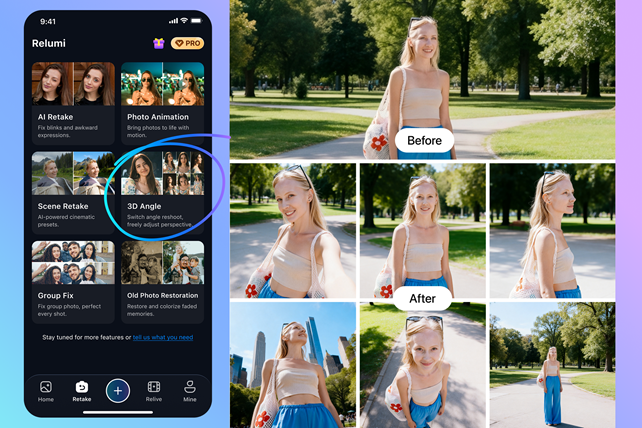
Photo to Video Gives the App Broader Appeal
Relumi also includes a Photo to Video feature with sound, allowing users to animate still images into short clips. This is one of the easier features to dismiss as trend-driven, but it still fits the product when framed correctly.
If Relumi is about helping users relive moments rather than simply repair pixels, then adding motion to a static memory feels like a natural extension. This could be especially appealing for pet photos, nostalgic portraits, and social posts built around sentimental moments.
Used lightly, animation can make a still image feel more immediate without pushing it too far away from the original memory.


Photo to Video expands Relumi beyond photo correction by turning pet photos into short animated memories that feel more lively and shareable on social platforms.
Who Relumi Is For
Relumi seems best suited for three main groups. The first is people who care about preserving meaningful photos, especially family pictures, travel shots, and life-event moments that cannot be retaken.
The second is everyday social media users who want to improve portraits and selfies without spending time on advanced editing.
The third is users who prefer having several AI photo tools in one app, including restoration, object cleanup, facial correction, and motion-friendly features like Photo to Video.
It is probably less appealing to users who want deep manual control or desktop-level editing precision. That is not really the point here. Relumi is positioned more around speed, convenience, and emotional utility than around professional editing workflows.
What to Keep in Mind
The strongest part of Relumi’s positioning is also where expectations need to be managed. AI Photo Retake is a clear and relatable promise, but users will still judge the app by how natural the results look on real photos.
That means the experience will likely depend on the original image quality, the complexity of the face or scene, and how subtle the edit remains. Results will matter most when the correction feels believable rather than obviously generated.
Users who want frame-by-frame manual control or heavily customized retouching may still prefer a more traditional editor. Relumi makes the most sense as a convenience-first app for rescuing meaningful photos quickly, not as a replacement for professional editing software.
Final Verdict
Wondershare Relumi stands out most when its identity is kept simple and explicit: this is an AI Photo Retake app for saving photos that matter but did not come out quite right.
That is a more grounded and memorable pitch than calling it only an AI photo enhancer. Group photo repair, scene relighting, angle correction, restoration, and Photo to Video all help round out the product, but they work best when they are clearly presented as supporting features around the same central promise.
AI Photo Retake remains the clearest core pitch, while features like AI Photo Restoration and Photo to Video expand Relumi’s value for users who want to make meaningful photos usable again, not just cleaner.
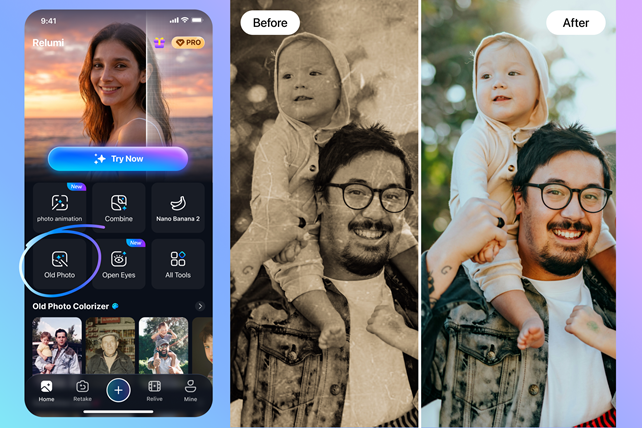
For readers who want to try it themselves, Relumi currently offers 90 free AI credits for new users and is available on Android via Google Play and on iOS via the App Store.
















Relumi’s focus on AI photo retake is genuinely useful—it targets real problems like closed eyes and awkward expressions instead of just adding beauty filters. That closed-eye correction feels like the standout feature, since it tries to keep the original mood rather than swapping in a generic face. For anyone who takes lots of group photos, that alone is worth trying. If you want a broader AI toolkit for editing or generating images, DeepAI also has helpful options, but Relumi is the one for rescuing near-perfect memories.