
Spaceship Review and Recommendations $9.48
-
Pricing and renewals
-
Features and Ease of use
-
Support and TLDs
-
Value for Money
Summary
Spaceship is an ICANN-accredited registrar run by Spaceship, Inc. in Phoenix, Arizona. They launched in 2023 and offer budget-friendly domain registration services with 100% free WHOIS privacy protection. I have used their services and will easily recommend them for ease of use, security, and a transparent pricing model.
Pros
-
Low-cost Renewal Prices: Consistently lower renewal fees than GoDaddy, Network Solutions, and Bluehost.
-
Zero Checkout Bloat: Free WHOIS privacy by default and no aggressive upsells.
-
Modern, Fast UI: Intuitive Advanced DNS editor with real-time propagation tracking.
-
Top-Tier Login Security: Native passkey and hardware key authentication.
-
Flexible Payments: Supports major credit/debit cards, PayPal, mobile wallets, and Bitcoin.
Cons
-
No Phone Support: The lack of phone support on Spaceship could be a concern to some customers. Support is strictly limited to live chat and email tickets.
-
Smaller Niche TLD Catalog: While all major TLDs (.com, .net, .org, .io, .ai, and popular country codes) are covered, some obscure extensions are not available on Spaceship. In fact, we won’t be able to maintain 3ptechi.es if they are the only domain registrars around 😂😅🤣
User Review
( votes)First things first:
Spaceship Overview and Features
1. Honest, Flat Pricing Without Renewal Traps
.com renewals hover around $10.18/year, and .com transfers are priced around $9.48. The checkout flow is clean as well: You won’t find pre-checked boxes sneaking expensive add-ons into your cart. The table below gives a cleaner outlook of their pricing model: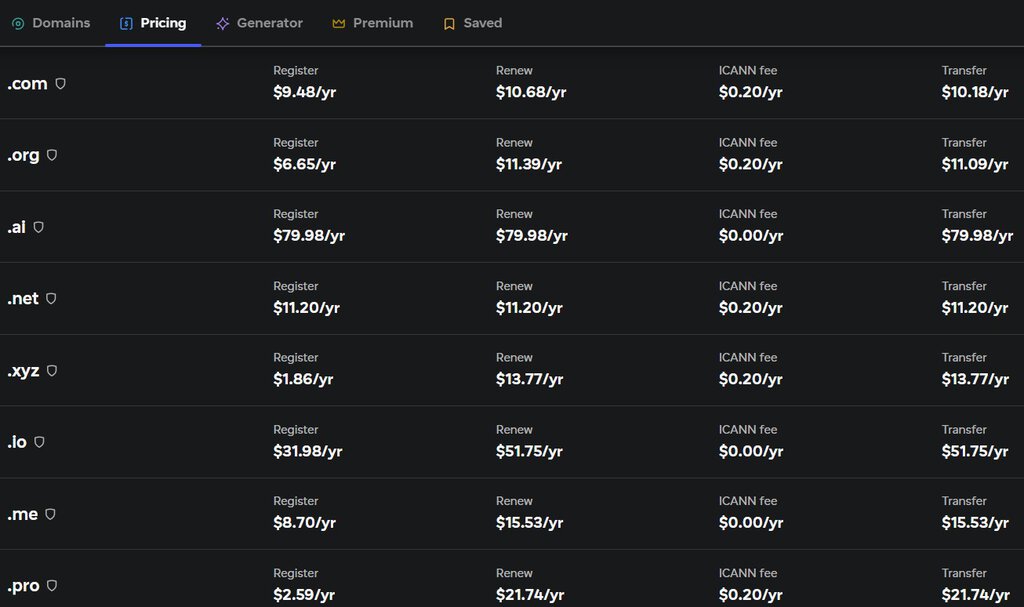
2. The “Launchpad” Interface & Advanced DNS Manager
-
Clean Dark-Mode UI: Everything is organized into modular apps inside your Launchpad (Domain Manager, Advanced DNS, Domain Portfolio, Transfer Manager, and Seller Hub).
-
Built-In DNS Propagation Checker: Instead of telling you to “wait up to 48 hours” and leaving you guessing, Spaceship’s DNS editor includes a live propagation status tool so you can verify when A, CNAME, MX, or TXT records go live globally.
-
Fast Record Updates: In practical use, standard DNS record updates propagate quickly (Less than 30 minutes in most cases).
-
Developer-Ready API: For technical users managing multiple properties, Spaceship provides a clean API for programmatic domain and DNS management.
3. Enterprise-Grade Account & Domain Security
-
Passkeys: Log in seamlessly using Face ID, Touch ID, or device biometrics.
-
Hardware Security Keys & TOTP 2FA: Full support for authenticator apps and physical security keys.
-
Free WHOIS Privacy: Your personal name, address, phone number, and email are redacted from public WHOIS databases automatically at no extra charge.
-
Free SSL on Redirects: Custom URL redirects are automatically secured with SSL certificates.
4. Unbundled Ecosystem (“Unbox™” Architecture)
How to Buy a New Domain Name on Spaceship (Step-by-Step Guide)
-
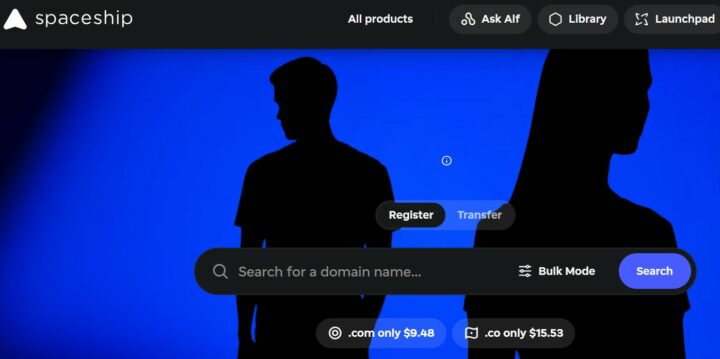
Visit the Domain Search Page: Head over to Spaceship.com and locate the main domain search bar right on the homepage.
-
Search for Your Desired Domain Name: Type your target brand name or domain idea into the search box (with or without an extension like .ai, .io, or .com) and press Enter. Spaceship will instantly check availability across primary and alternative top-level domains (TLDs).
-
Compare Availability and Renewal Pricing: Review the search results. Pay close attention to both the first-year registration price and the standard renewal price displayed clearly next to each extension. If your exact
.comis taken, check clean variations or relevant extensions like.ai,.org,.net,.io, or.co. -
Add the Domain(s) to Your Cart & Open Checkout: Click the Add to Cart button next to your chosen domain, then click the cart icon to proceed to checkout.
-
Configure Registration Term & Auto-Renew: Inside your cart, select your registration duration (from 1 to 10 years for standard domains). Confirm that Free WHOIS Privacy is toggled on and enable Auto-Renew if you want to protect your domain from accidental expiration.
-
Create Your Spaceship Account: Sign in if you already have an account, or create a new Spaceship account during checkout. Make sure to use a primary, accessible email address. This is because ICANN rules require you to verify your contact email after purchase.
-
Enter Registrant Details and Complete Payment: Fill in valid contact information for domain ownership compliance, select your preferred payment method (card, PayPal, mobile wallet, or crypto), and complete the transaction.
-
Verify Your Email & Configure DNS in Launchpad: Check your inbox immediately for the ICANN verification email and click the confirmation link. Once verified, open Domain Manager or Advanced DNS from your Spaceship Launchpad to point your nameservers or add A/CNAME records for your website.
My Spaceship Review and Verdict
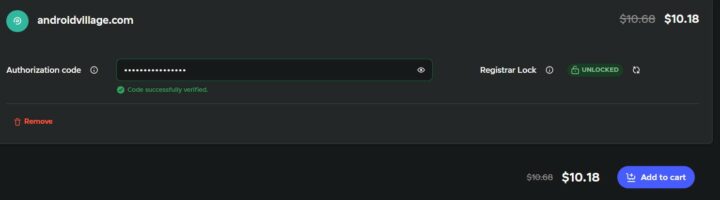
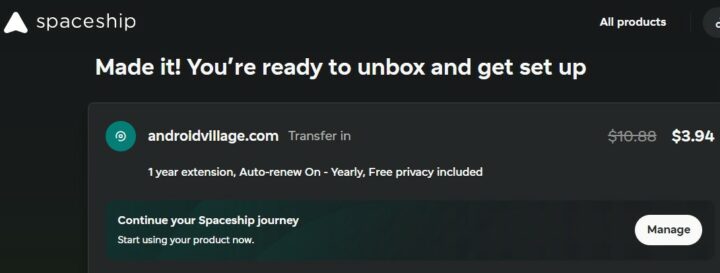
For context, I have been buying domain names since 2009, and have used several domain registrars over the years. This week’s purchase was primarily to test and review Spaceship domain name services. I used the domain transfer option to move one of our domain names from NameSilo to Spaceship.
The domain name I moved to Spaceship is androidvillage.com, and I used a coupon code that reduced the domain renewal price from $10.66 to $3.94 to complete the process (as seen in the image attached below).
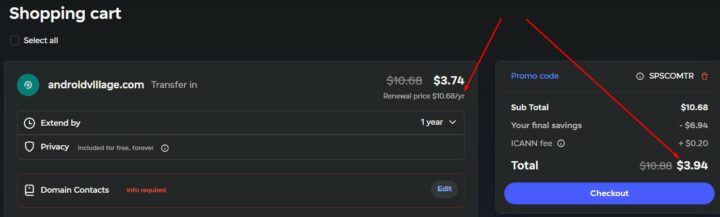
My experience was completely worth it. Zero bloat and a straightforward checkout process. So, if you are tired of overpaying for domain renewals or dealing with cluttered registrar dashboards, Spaceship is one of the easiest options to choose. Between its flat, near-wholesale pricing, free WHOIS privacy, passkey security, and real-time DNS propagation tracking, it delivers everything you need (as a blogger or web developer) without the junk.
While there’s a lack of phone support, the ASK Alf chatbot ensures that you’ll get a faster response to your support questions without waiting for human intervention (except when necessary). I contacted their support a few times to check the quality of responses received from it. It’s not a generic “throw everything at it chatbot”, but one that intelligently resolves the questions thrown at it.
Overall, Spaceship is a functional ICANN-accredited domain registrar offering low-cost domain name registration services that are close to wholesale rates. I can recommend them for ease of use, security, and a transparent pricing model.
Frequently Asked Questions
Yes. Spaceship, Inc. is ICANN-accredited (IANA ID 3862) and based in Phoenix, Arizona. It manages millions of domains and has a Trustpilot score of about 4.5, though it has a shorter history than most popular registrars.
Not exactly. Spaceship is a separate company, but it was founded by Namecheap’s founder, Richard Kirkendall, and its name is a Namecheap trademark. Some people consider it a Namecheap-group product.
Yes, Spaceship includes free WHOIS domain privacy protection by default on all eligible domain extensions, keeping your personal contact details hidden from public WHOIS lookups without extra fees.
Spaceship operates on a low-margin, transparent pricing model designed around near-wholesale registration and renewal rates rather than subsidizing cheap first-year promos with inflated renewal hikes.
No. You can register a domain name by itself on Spaceship and point its nameservers or DNS records to any third-party web host, website builder, or CDN (such as Cloudflare, WordPress hosts, or Vercel) at no extra cost.
Yes. Spaceship features a dedicated Transfer Manager that lets you transfer eligible domains from other registrars. Standard .com transfers are competitively priced (around $10.18) and automatically add one full year to your existing expiration date.
Yes. It offers a public API and bulk tools for developers, agencies, and domain investors.
No, Spaceship does not offer phone support. They handle customer assistance 24/7 through live chat and email support tickets.