
CZUR StarryHub Core 20 meeting hub is a compact, portable 12MP 4K AI conferencing system for businesses with remote operations. It can come in handy for virtual meetings, conferences, and remote file and document sharing. Today, we’ll take a closer look at CZUR’s all-in-one meeting hub device, StarryHub Core 20, which can turn any HDMI screen into a 4K conference room in about a minute.
If you’ve ever had to set up for a “simple” video call in a small meeting room, you know the drill: get a webcam balanced on top of the TV or monitor, connect a speaker device via Bluetooth or an audio jack, tether a laptop via HDMI cable to the TV or monitor, and then go through a series of audio checks to confirm that the other people talking remotely can hear what’s been said from the small room.
Obviously, these things can get tiring most of the time, and that’s where you may appreciate the features and functions of CZUR’s StarryHub Core 20. This workstation hub packs a 4K camera, a six-microphone array, built-in hi-fidelity speakers, and runs an Android-based computer, all packaged into a compact box that plugs into whatever TV, monitor, or projector you already have. No separate meeting PC, no pile of dongles.
CZUR StarryHub Core 20 At a Glance:
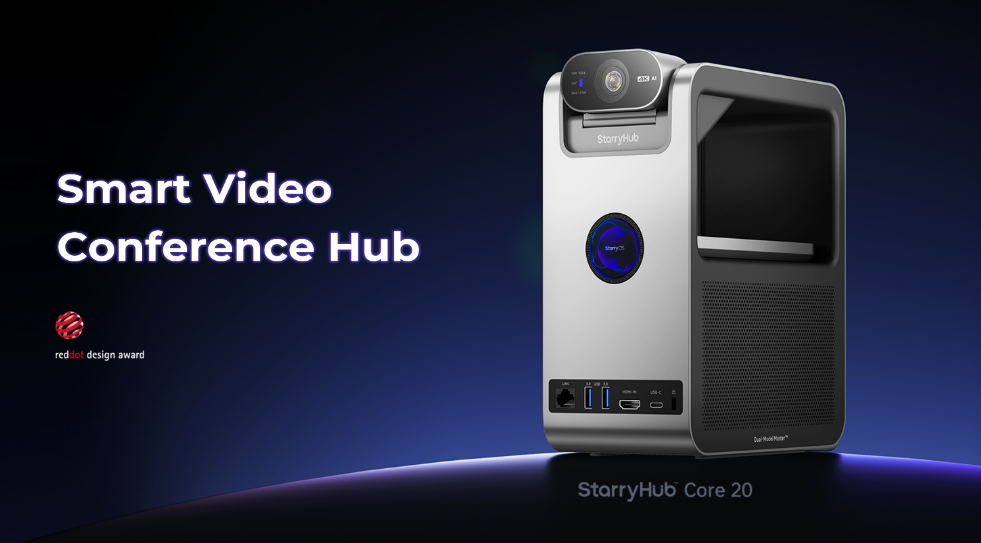
| Device Name | CZUR StarryHub Core 20 |
| Purpose | All-in-one smart video conference hub (camera + mics + speakers + computer) |
| Camera | Single 12MP ultra-wide camera, 4K (3840×2160), 123° field of view |
| Microphones | 6-mic circular array, 360° pickup, 5 to 6 m range |
| Speakers | Dual 6W (12W total) |
| Room size | CZUR says under 20 participants |
| Display connection | HDMI out (works with TVs, monitors, projectors, LED walls) |
| Operating system | StarryOS 6.0 (based on Android 14) |
| Wireless casting | Up to 4 screens at once |
| Warranty | 1 year |
A boxed purchase comes with:
- StarryHub Core20
- A packing case
- Power Adapter
- USB Cable
- TouchBoard
- Quick Start Guide
The Full Intro
The Core 20 is the smallest model in CZUR’s new StarryHub Core Series, which has three members: the Core 20 for small rooms, the Core 30 for mid-sized rooms, and the Core 50 for larger rooms and boardrooms. All three share the same basic idea that CZUR calls “bring your own display,” since the hub has no projector or screen of its own; you’re required to connect it to a display you already own over HDMI.
Unlike the StarryHub Projector series we previously reviewed, the StarryHub Core 20 left out the display projection part and kept the “brains.” The first-generation StarryHub had a built-in projector, which suited rooms with no screen. So, the StarryHub Core series is like the second-gen with more advanced technology but no display.
This meeting hub delivers 4K video, and you can wirelessly project up to 4 screens into the hub for screen sharing; it supports Windows, macOS, iOS, Android, and HarmonyOS devices. Being designed to be used in meeting rooms hosting a maximum of 20 participants, having this set up in larger conference rooms may result in low audio reception, and some people may not fall into the camera’s frame.
Full Specifications
| Model | StarryHub Core 20 |
| CPU | Octa-core (8nm), up to 2.2GHz, 64-bit |
| GPU / NPU | Tri-core GPU / 6 TOPS NPU |
| Memory / Storage | 4GB LPDDR5 / 32GB eMMC (expandable via USB drive) |
| OS | StarryOS 6.0 (Android 14-based) |
| Wi-Fi | Wi-Fi 6, dual modules, 2.4GHz/5GHz, AP/STA + P2P modes |
| Bluetooth | 5.3 |
| Cellular | No 4G/SIM support (customizable, per CZUR) |
| Inputs | DC IN, LAN, HDMI IN (2.0, HDCP, up to 4K@60Hz), USB 3.0 x2, USB-C |
| Outputs | HDMI OUT (2.1, up to 4K@120Hz, HDMI CEC supported), 3.5mm AUX |
| Camera | 12MP, 1/2-inch sensor, 3840×2160, 123° FOV, HDR, CZUR PureMirror 1.0 |
| Camera features | Auto framing, subject tracking, sound source localization, low-light enhancement, highlight suppression, 3D distortion correction, touchless gestures |
| Microphones | 6-mic circular array, 360° pickup, 5 to 6 m, CZUR PureVoice 2.0 |
| Speakers | 6W x 2, fidelity above 99%, two EQ modes (Conference and Entertainment) |
| Status display | 1.32-inch round LCD, 360×360 |
| Power | DC 16V/3A, about 28W in use, under 0.55W standby |
| Size / Weight | 196.5 x 105 x 238.5 mm / 1.64 kg |
| Mounting | 1/4-inch threaded hole (bottom), 7 x 3 mm anti-theft lock slot |
CZUR StarryHub Core 20 Features
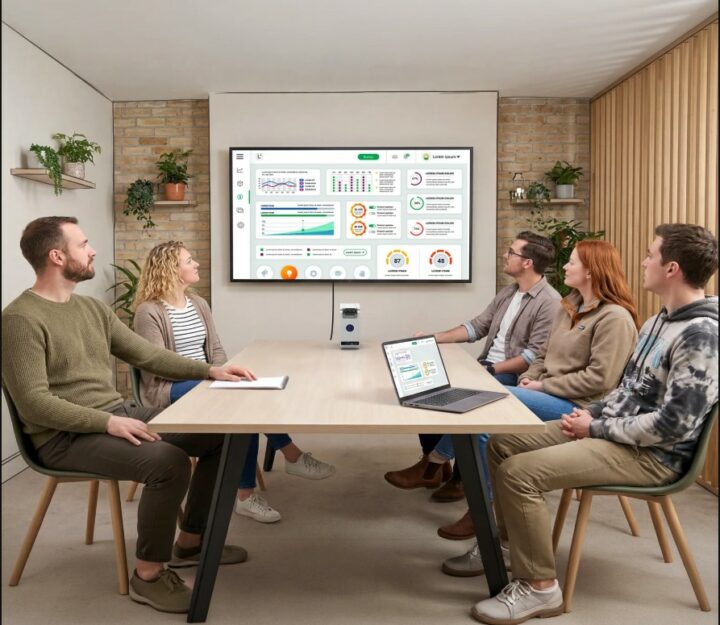
On paper, the CZUR StarryHub Core 20 packs a plethora of features, but here are the most important ones to help you decide whether you need this AI meeting hub.
1. 12MP 4K Camera With Auto Framing and Speaker Tracking
Starting with the camera, it features a 12MP 1/2-inch sensor, capable of shooting up to 4K with a 123° ultra-wide view. This wide-angle view should be enough to cover a full small meeting table from one position. The camera also features CZUR’s AI tuning, automatic low-light adjustment, highlight suppression, and distortion correction.
The auto framing function adjusts the shot to the number of people in the room, and speaker tracking follows whoever is talking. Also, the camera supports touchless gestures, letting participants use gestures to track a subject or lock onto a whiteboard. There is also a physical privacy mode where the camera retracts to 0° to blind out the view; this is the technical alternative to putting a cover over a webcam for privacy.
2. Six-Mic Array With PureVoice 2.0
Honestly, the 6-mic array looks to be a standout feature. The 6 microphones are top-mounted in a circular array for 360° pickup, and CZUR rates it for voices from 5 to 6 metres away. Also, the technology behind the mic array is what CZUR calls the PureVoice 2.0; it delivers echo cancellation, background noise reduction, vocal enhancement, near-far voice levelling (the voice of someone from the far end in the meeting room will still sound the same as that of the person right in front of the StarryHub Core 20), and full-duplex audio where both sides can talk at once without clipping.
3. Host Mode and Bring Your Own Meeting (BYOM)
This is the part that makes the Core 20 more than a webcam with a speaker. The system is built to run meetings in two distinctive modes:
- Host Mode: Here, the Core 20 runs the meeting app, so you do not need a laptop plugged in. It supports Google Meet, Zoom, Teams, and most other Android-based conferencing apps.
- BYOM (Bring Your Own Meeting): In this mode, you connect your laptop, and the hub acts as its camera, microphone, and speaker, so you can use whatever meeting software you prefer. This works over USB or wirelessly (the wireless route needs an optional CZUR module).
4. Dual 6W Speakers
This meeting hub delivers crisp audio through dual 6W speakers, so it’s 12W in total, and the speakers offer two sound modes: a Conference mode that boosts mid-range vocals and an Entertainment mode with fuller dynamic range. The second one is handy if the same TV doubles as a screen for a video or a team celebration. Hearing the participants on the other side is super clear.
5. Up to Four-Screen Wireless Casting
Now it’s getting to the interesting parts. The StarryHub Core 20 lets you cast up to four different devices at once to the display, for side-by-side comparisons (budget vs. actuals, two designs, two reports) or any other need that requires such activity.
Supported casting methods include Miracast, AirPlay, Screen Mirroring, DLNA, Chromecast, CZUR’s own ClickDrop, and the CZUR Share app. In that regard, you can cast from a Windows PC, MacBook, iOS or Android device, and even Huawei HarmonyOS devices. Interestingly, you can cast wirelessly or with a wired HDMI input at the same time.
6. Recording, Whiteboard, Meeting Minutes, and Translation
On the software side, the StarryHub’s recording mode captures audio, screen (with picture-in-picture), video, and photos, saved on the device’s 32GB of storage. Also, there’s an annotation whiteboard with colours, undo/redo, and save-and-share, plus wireless file transfer through CZUR Share. Finally, the system supports real-time speech-to-text with an after-meeting summary, and a bilingual subtitle overlay for two-language meetings.
7. Touchpad Control and Accessories
The box includes a Bluetooth touchpad with gesture support and a full keyboard layout. For anything beyond the basics, CZUR sells optional accessories: TouchBoard Pro, a wireless WritePad tablet (which supports four devices writing at once), and the ClickDrop wireless HDMI transmitter.
8. Built-In Security
Well, there are a few security details that may interest you on this system. Its file system is encrypted, plus there is a standard 7 x 3mm anti-theft lock slot for a Kensington-style lock, and the bottom has a 1/4-inch threaded hole for mounting on a stand or bracket. Talk about the little details that matter.
How to Use the CZUR StarryHub Core 20
The system comes with a Quick Start Guide out of the box, which is quite handy for learning how to operate the device and explore its features. However, here’s a succinct, more explicit walkthrough.
Step 1: Connect It to Your Display
To get started, after you have placed the Core 20 where it should sit in the meeting room, definitely at the front of the room where the camera can see everyone and usually near the TV or screen, then you have to get an HDMI cable, plug it into the Core 20’s HDMI OUT port and then to your TV’s or monitor’s HDMI input. Once that is done, proceed to power on the StarryHub Core 20.
Step 2: Get It Working
Ensure your display’s input source is switched to the HDMI channel you plugged in the HDMI cable coming from the Core 20. The system runs on Wi-Fi 6 protocol and also supports a LAN port, so you can connect wirelessly or use wired Ethernet if the room’s Wi-Fi is weak.
Step 3: Cast Your Screen
Choose the casting method that suits your device: AirPlay for iPhones and Macs, Miracast for Windows, Chromecast or Screen Mirroring for Android, or the CZUR Share app for any supported device. To cast with AirPlay, enter the short on-screen code into the AirPlay prompt; it’s similar for the other casting methods.
Step 4: Run a Meeting in Host Mode
If you and your team are hosting the meeting, the Core 20 supports Zoom, Teams, and Google Meet. Simply open either of these apps once the hub is powered on and sign in, using the touchpad keyboard to enter your details. Once signed in, you can set up any meeting options you want.
To record a meeting, enable recording mode, and turn on the whiteboard for annotations, while file transfers are enabled via CZUR Share. However, the Core 20 offers only 32GB of storage; you may need to plug in a USB storage device if your recording exceeds 32GB.
Step 5: Use BYOM (Bring Your Own Meeting)
If you don’t want to log in your personal details on the StarryHub Core 20, switch its mode to BYOM via the on-device settings page and connect your laptop with the dedicated USB cable from the box, or use the optional wireless connectivity. After that, log in to Zoom, Teams, or Meet on your laptop and choose the StarryHub as your camera, microphone, and speaker.
Note: If the included USB peripheral cable doesn’t match your PC’s USB interface, you will need a USB adapter to establish the connection.
CZUR StarryHub Core 20 Overview and My Honest Take
The CZUR StarryHub Core 20 is a one-box solution that replaces webcams, physical speakers, casting dongles, and meeting PCs for business meetings or classroom meetings. Yes, it is not only meant for business meetings; you can use this in small classrooms with 10 to 20 students.
It is useful for design and packs good features for the size of participants it is recommended for. The one thing I wish it had was a display, or the ability to project it onto a wall or canvas without having to go through the whole HDMI connection to a TV or monitor.
However, the display output is superb, and the speaker delivers fine audio. The system packs an array of recent tech, including Wi-Fi 6, Bluetooth 5.3, USB 3.0, and HDMI 2.1 output, plus a LAN port. But it lacks processing power, with only 4GB of RAM and 32GB of storage; these are meager and may cause the system to lag during long meetings or frequent multicasting.
Overall, the setup is pretty straightforward; the system has to be plugged directly into power at all times, as it has no battery to hold a charge. Starting at $999.00, the StarryHub Core 20 isn’t the least affordable meeting hub out there, but it’s surely one that measures up to its cost in terms of what it delivers.
All in all, the StarryHub Core 20 is a powerful meeting hub with plenty of modern technology features that meet the needs of modern conference rooms and digital classrooms. It works with any display screen with HDMI input and doesn’t require additional speakers or mics; plus, the touchpad is super intuitive for navigating the system and selecting the mode or feature you want to use.