
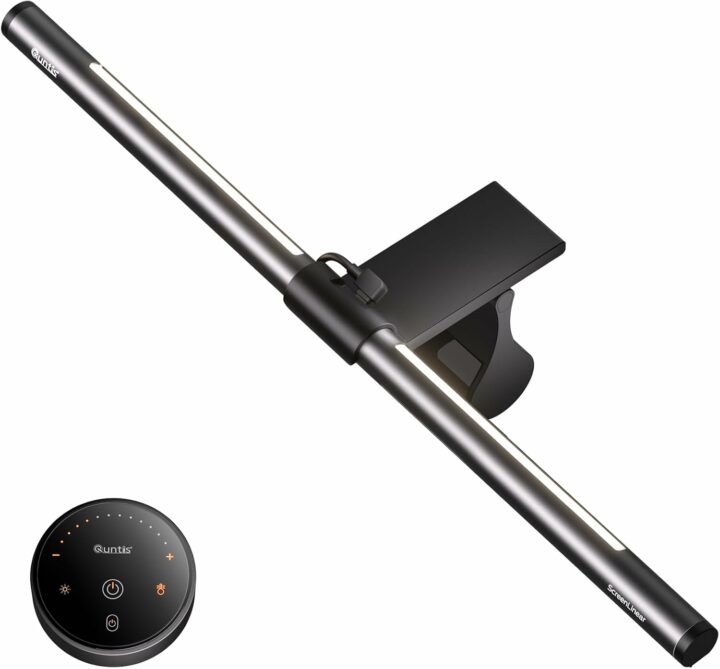
For years, I have been using monitor light bars as part of my daily desktop setup. After testing multiple well-known brands, I quickly learned how big of a difference a good screen lamp can make. The core concept is straightforward: light up your desk surface and keyboard while avoiding harsh glare and reflections on your monitor panel to reduce eye fatigue during long working hours.
However, not every monitor light bar delivers the same experience. Many generic options have uneven light spread, limited adjustability, or build-quality shortcomings. That’s why I wanted to put the Quntis Monitor Light Bar Glow 41 cm (16.1 inch) Grey through real daily use to see how it performs for regular office work, content creation, and late-night browsing.
Package & First Impressions
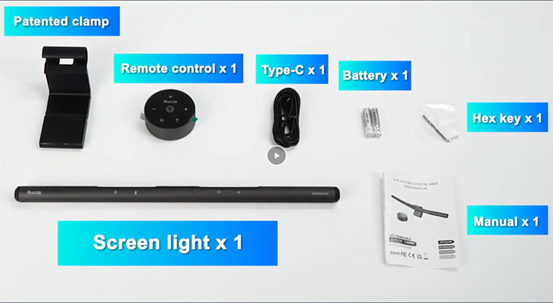
Opening the package, you get the monitor light bar unit, a Clip, USB-C cable, remote control, battery, and user manual. The build quality feels solid. It follows a clean, minimalist aesthetic that blends seamlessly with modern desks, gaming setups, and home-office environments. No cheap-feeling plastic parts, no unnecessary flashy decorations.
Why Should You Use a Monitor Light Bar?
When you work in dim rooms, there is a huge brightness gap between your bright monitor screen and the dark surrounding room. This contrast is a major trigger for eye strain, dry eyes, and fatigue after hours in front of the computer. Regular desk lamps often create glare on the screen or cast uneven shadows over your keyboard, mouse, and notes. You can now upgrade your desktop lighting setup with the Quntis computer monitor light bar with a remote-controlled desk lamp and glowing backlight.
A well-engineered monitor light bar solves these pain points:
- Cuts down on eye fatigue during long screen sessions
- Illuminates your keyboard and desktop workspace evenly
- Avoids direct light reflections on your monitor display
- Creates a balanced, comfortable ambient lighting environment for work or gaming
It is not just a cosmetic desk gadget; it brings tangible comfort improvements for anyone spending multiple hours per day at their computer.
Installation and Setup
Setting up the Quntis monitor light bar takes less than one minute. Simply attach the light bar to the clip and place it directly on top of the monitor.
I really like that you can feed the USB cable toward the back of your monitor, so loose wires do not clutter your front-facing desk view. If your monitor features built-in USB output ports, you can power the light bar straight from the screen itself, minimizing extra cables around your desk.
No complicated software installation is required. Everything works plug-and-play right out of the box.
Real-Daily Usage
This is where the light bar shines in practical use.
The light output is distributed widely and evenly across the desk area in front of the screen. Your keyboard, mouse pad, and paper notes all get proper illumination, without bright hot-spots or dark shadow zones. Light is projected downwards toward your desk surface rather than straight toward your eyes, so you will not experience annoying screen glares.
You get multiple ways to adjust lighting to match your environment. Touch controls are built-in on the light-bar body: tap to toggle power, raise/lower brightness, and switch colour temperature modes. You can cycle between cooler daylight tones for focused daytime work, and warmer, softer light for evening use.
Adjustability makes it easy to adapt to changing room lighting. On bright afternoons, you can bump brightness up; late-night sessions benefit from warmer, dimmer lighting to reduce eye stress.
The unit stays low-profile once mounted. It does not block the view of your screen and does not ruin the visual look of your desktop arrangement. It simply becomes a quiet, useful part of your workspace.
Who Is This Monitor Light Bar For?
This Quntis light bar is a fantastic pick for several user groups:
- Home office workers putting in long hours in front of flat monitors
- Content creators and editors who need consistent desk lighting
- Gamers wanting comfortable ambient lighting without RGB distractions
- Students studying online or engaging in long hours of typing, drawing, reading, and other study activities.
- Anyone who wants to reduce eye strain without installing bulky desk lamps
Conclusion
The Quntis monitor light bar is a practical, well-built desktop accessory that delivers real-world comfort benefits rather than just aesthetic flair. Simple tool-free mounting, solid build quality, flexible brightness and colour-temperature adjustments, plus glare-free directional lighting all combine into a compelling package.
If you spend lots of time in front of your monitor and struggle with dim room lighting or eye tiredness, a good monitor light bar is well worth considering. This model competes very favourably against more expensive alternatives on the market.
You can “Find Your Light” that suits your monitor here.