
You have a photo, a first name, and very little else to work with. Perhaps someone has contacted you through a dating app, or you want to check whether your own picture is being used on another account. Searching a name helps little when you don’t know the surname, and a username only gets you somewhere if you already have it.
Face2Social is built around that starting point. You supply the photo, and the service looks for possible social media profile matches. The useful part is what comes back: an account you can open and examine, with more context than a photograph on its own.
So, what can you expect from it? This review covers its main features, the search process, and a brief comparison provided by the team behind the product.
Face2Social Overview

Face2Social focuses on finding public profiles across Instagram, Facebook, TikTok, and X. According to the team, its current coverage is US-focused. If you need to search for someone outside the United States, establish whether the service covers your use case before considering a purchase.
The product’s appeal is fairly specific. It gives you somewhere to start when you have a face but lack the name or handle needed for a conventional account search.
That also gives it a clear boundary. In the version covered by the company’s comparison, LinkedIn and OnlyFans were not indexed. Someone looking primarily for a professional profile would therefore need a different option.
The Main Features That Matter to Users

1. Direct Links to Social Profiles
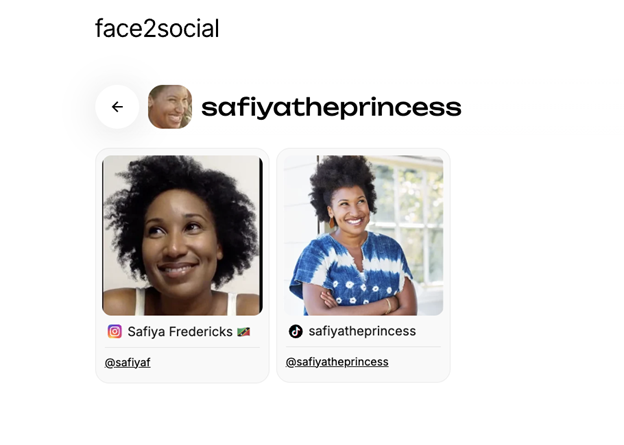
Finding a photograph of someone and finding an account featuring that person are different outcomes.
Imagine that a search returns an event photograph on a photographer’s Instagram page. The face may be correct, but there are still several people in the picture, and none of them is tagged. You now have another page to investigate.
A direct profile link gives you a more useful next step. You can inspect the account’s public bio and any visible content, then decide whether the surrounding details fit. This is the main reason to consider Face2Social: the result format fits a search for social accounts.
It still takes judgment. An account displaying someone’s face is not automatically controlled by that person; copied photos and impersonation are exactly why this distinction matters.
2. A Preview Before Payment
According to Face2Social’s description of its search process, users can upload a photo and sign up to see a free preview. This may include blurred profile cards, supported networks, and match indicators. Revealing available profile details requires payment.
The page currently advertises pricing starting at $3.99 for the first week, with billing terms shown before payment. That is an introductory period, not a quoted permanent price per search. Its “No Match – No Charge” wording applies when there is no result available to reveal; it should not be read as a guarantee that a suggested match is correct.
3. Results From Some Small Face Crops

Not every available photo is a clean headshot. Sometimes the person occupies only a small part of a larger image.
In the company’s pilot, Face2Social returned a reviewer-confirmed match for all five reviewed faces measuring less than 30 pixels on their shorter side. The smallest successful face measured 23 × 34 pixels.
That is an interesting finding for people working with small images, but five examples do not establish a reliable minimum size. They show that those particular searches worked. They do not tell us how another blurry or poorly lit photo will perform.
How to Use Face2Social
The documented workflow is short: upload a photo, register to view the preview, then decide whether to pay to reveal the available details. Face2Social says its matching can work with different photos of the same person, so an identical image on the social account is not required. The official guide explains these steps.
The more useful question is how to assess what you get back. Start with a photo you can compare clearly. Once you have a result, open the linked account and look at the available context. Does it contain several pictures that appear consistent with the person? Do the public details fit what you already know? Is there enough information to make any judgment at all?
For example, suppose a dating profile uses one name while a possible matching social account uses another. That gives you a question to ask. It does not, by itself, explain whether you are seeing a nickname, an unrelated person, or a copied photograph.
Treat an empty result with the same care. A search that finds nothing leaves the question unresolved. It does not prove that the person has no social accounts.
Face2Social vs. FaceCheck.ID and Social Catfish
The Face2Social team supplied a report titled “Best Face Search Engines for Social Media in 2026.” It compared searches using 20 faces cropped from two stock photographs: a group dinner and a yoga class. Each service received the same individual crops.
The report’s main calculation includes 18 faces. One other face had not been reviewed, and another had been reviewed without a confirmed match but was also excluded. That second exclusion makes the headline fraction more favorable than including every reviewed face would, so the denominator deserves attention.
Here are the reported results for the 18-face analysis:
Results in the supplied pilot | Face2Social | FaceCheck.ID | Social Catfish |
| Faces with at least one reviewer-confirmed match | 15 of 18 | 7 of 18 | 2 of 18 |
| Confirmed result links | 23 | 23 | 3 |
| Confirmed links leading directly to profiles | 23 | 3 | 3 |
| Confirmed links leading to posts or other pages | 0 | 20 | 0 |
The most useful detail is the difference between the two rows of 23 results. Face2Social and FaceCheck.ID returned the same number of confirmed links, but those links led to different places. All 23 from Face2Social were profiles. Most of FaceCheck.ID’s were posts or other pages.
For someone trying to locate an account, that can change how much work remains after the search. A post might still provide an excellent lead, especially if there are tags or helpful captions. A profile simply puts the account in front of you immediately.
There were also cases Face2Social missed. FaceCheck.ID found two people that the other services did not find in this pilot. Social Catfish’s three confirmed results were LinkedIn profiles, a platform outside Face2Social’s tested coverage.
These findings support a narrow conclusion: Face2Social produced more direct social-profile matches in this particular exercise. They do not establish an accuracy rate for everyday searches. The test used two photos, one reviewer, and no complete verified list of the participants’ accounts. The reviewer assessed facial matches and link types, not who actually operated each account.
What About Pricing and Value?
The comparison also modeled search costs using the prices recorded in its source report. Under those assumptions, FaceCheck.ID was cheaper per search that produced a confirmed match. Face2Social’s advantage was the number of people found and the direct profile links returned.
Those historical calculations should not be used as current price quotes. For an individual user, the decision is simpler: consider the offer shown at checkout, how many searches you actually need, and what the preview tells you before paying.
A low price does not help much if the result cannot answer your question. Equally, a more expensive service is not automatically a better purchase. The relevant outcome is a useful lead you can evaluate.
Who Is Face2Social Most Useful For?
The strongest fit is someone who needs public social-account context and has a photo as the starting point. A dating-profile check is one example. Checking your own image for possible impersonation is another.
In both cases, the value comes from being able to inspect the result. A name, a collection of public photos, and the account’s visible history can give you more to work with than a face thumbnail alone.
It is a weaker fit when your main target is a professional network it does not cover, or when you need to locate every webpage containing a particular photograph. Those are different search goals, and the pilot itself shows why coverage matters as much as recognition.
Advantages and Limitations
The strongest points:
- Direct profile links suit users looking for social accounts.
- The company pilot found matches across more of the tested faces than either main comparator.
- Some very small face crops produced useful results in that pilot.
The main limitations:
- Coverage is focused on particular platforms and, according to the team, the US market.
- The supplied performance evidence is small and company-run.
- A matching face does not establish account ownership.
- Even a correct profile match may leave your original question unanswered.
Verdict: Is Face2Social Worth Trying?
Face2Social has a clear use case: helping you move from a photograph to a possible social media account. Its most convincing feature is the directness of the result. If a relevant profile is found, you have something concrete to open and review.
The company’s pilot offers encouraging examples, particularly for direct profile links and small face crops. It also shows why no single service should be expected to find everyone.
If your search fits its coverage, the sensible starting point is the free preview on Face2Social. Look at what is available, check the payment terms, and decide whether the additional profile information is worth accessing. The product is most useful when you approach it with a specific question and take the time to examine the answer.
Disclosure: This sponsored article was contributed by the Face2Social team. The comparative results below come from the company’s own pilot study, not an independent test by 3ptechies.