
Free Instagram resources are most useful when each one solves a narrow problem. One service may help you check public follower activity, another may show account growth, while a separate editor handles posts and Stories. Keeping a small set of focused options can save more time than searching for one service that claims to do everything.
Pick by Task, Not by Feature Count
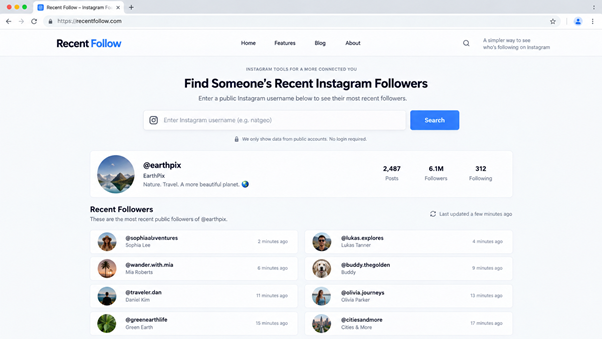
Before saving anything to your bookmarks, decide what you actually need to do. If you want to check recent public account activity without signing into Instagram, Recent Follow focuses on recent followers, recent following, and anonymous Story viewing. If the goal is your own account performance, Instagram Insights is more relevant. Content creation, scheduling, and public profile research each call for a different option.
| Need | Best fit |
| Recent followers and following | Recent Follow |
| Your own account analytics | Instagram Insights |
| Post and Story design | Canva |
| Social graphics and scheduling | Adobe Express |
| Scheduled publishing | Buffer |
| Public growth history | Social Blade |
| Public profile research | Inflact |
Recent Follow for Recent Followers and Story Checks
Recent Follow organizes recent followers and following activity for public Instagram accounts and also provides an anonymous Story viewer. Its site states that no Instagram login is required to start a check. That makes it useful when you need to look at public activity without connecting your own Instagram account.
A simple use case is checking whether a public account has recently started following new profiles, then opening its current Stories separately. The limitation is important: the service is built around public Instagram information, so it should not be treated as a way to access private account data. That boundary matters.
Instagram Insights for Numbers From Your Own Account
Instagram Insights belongs in a different category because it is meant for your own professional account. Meta states that creator accounts can access the Professional Dashboard and view insights there. This is the better choice when you need first-party performance information rather than observations about another public profile. A creator could compare recent posts, review audience response, and decide which content deserves another version.
Canva and Adobe Express for Content Creation
Canva
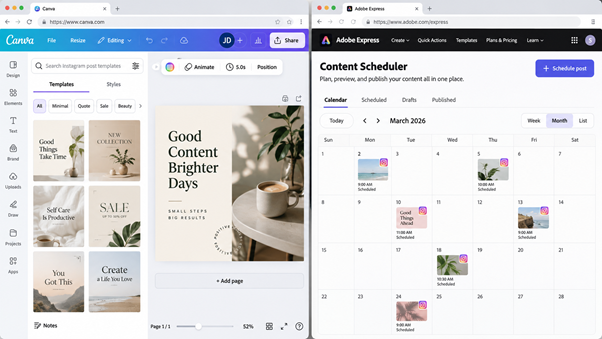
Canva is useful when the problem starts before publishing. Its Instagram post creator includes customizable templates, a drag-and-drop editor, free stock photos and graphics, and options for posts, carousels, and video content. A small business could take one product photo, place it into a reusable template, then create several visual variations.
Adobe Express
Adobe Express covers a similar need but combines design with a built-in Content Scheduler. Adobe says its free plan includes the scheduler and allows up to 1,000 scheduled posts per month, although multi-account publishing has additional plan restrictions. This works well when you want to create a graphic and move it into a posting calendar in the same workspace.
The choice does not need a long comparison. Canva makes sense when templates and visual editing are the priority. Adobe Express is worth bookmarking when creation and scheduling need to sit closer together.
Buffer, Social Blade, and Inflact for Planning and Research
Buffer
Buffer is a practical option for scheduled publishing. Its current free plan supports up to three channels and keeps up to ten scheduled posts per channel in the queue. You could prepare a week of Instagram posts, set publication times, and avoid opening the app every time something needs to go live.
Social Blade
Social Blade is better for public growth research. Its Instagram pages can show follower count, media count, engagement rate, average likes, average comments, and recent growth charts, although some views require a login or paid membership. It is useful for checking direction over time rather than trying to explain why a specific person followed or unfollowed an account.
Inflact
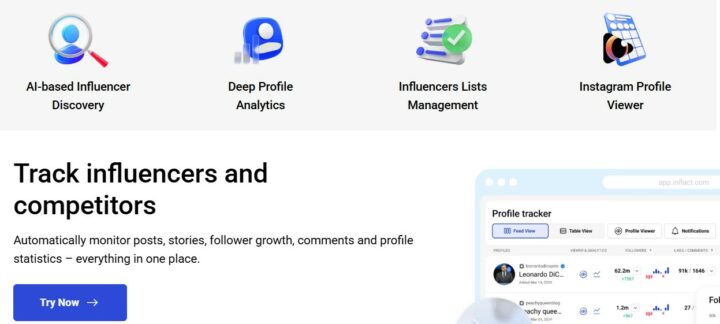
Inflact fills another research gap. Its Profile Analyzer works with public profiles and reports metrics around followers, engagement, posting activity, and content patterns. The free version has limits, and Inflact states that private profiles cannot be analyzed. A useful case is comparing several public creator accounts before deciding which ones deserve closer manual review.
These three services overlap less than they first appear. Buffer helps you publish your own content, Social Blade is useful for historical public growth checks, and Inflact is better suited to profile-level research.
A Simple Free Instagram Workflow
The most useful setup is not necessarily the one with the most bookmarks. A better approach is to connect a few specialized tools into a repeatable workflow. Start with research, move into content creation, schedule what you produce, and then review the results before repeating the cycle.
For example, you could use Recent Follow, Social Blade, or Inflact when researching public accounts and looking for patterns worth exploring. Once you have a content idea, Canva or Adobe Express can handle the visual production stage. Buffer can then move finished posts into a publishing queue, while Instagram Insights gives you first-party performance data after the content is live.
Stage | What to do | Useful options |
| Research | Review public account activity and growth patterns | Recent Follow, Social Blade, Inflact |
| Create | Turn an idea into a post, carousel, or Story asset | Canva, Adobe Express |
| Schedule | Prepare upcoming content for publication | Buffer, Adobe Express |
| Review | Check how your own published content performed | Instagram Insights |
This kind of workflow also makes it easier to decide which bookmarks are actually worth keeping. If a service does not support a recurring task, it probably does not need to stay in your everyday toolkit. Start with two or three tools, use them for a few weeks, and add another only when a specific gap appears.
FAQs
No. A better setup usually starts with one option for each recurring task. If you create content, schedule posts, and research public accounts, three or four bookmarks may cover nearly everything you do each week.
Not in every case. Free plans often limit history, account connections, search volume, or advanced reporting. They work best for occasional checks and focused workflows, while larger teams may eventually need broader reporting or higher usage limits.
Start with the action that wastes the most time. If checking recent followers is repetitive, use a focused follower service. If designing posts is the bottleneck, keep a visual editor. If scheduling is the problem, choose a publisher. An efficient Instagram setup is usually a small chain of specialized services, not one oversized dashboard.