

If you’ve spent any time creating video content recently, you already know the struggle. Inconsistent lighting between clips, shaky footage, characters that look slightly different from one scene to the next, color grading that never quite matches — these are the kinds of problems that used to require expensive software, skilled editors, and hours of manual work.
AI is changing that equation dramatically, and the results are reshaping how creators, marketers, and filmmakers approach their entire production workflow.
Here’s a straightforward look at exactly how AI is improving video quality and content consistency, and which of these tools are worth your attention in 2026.

The Basics of AI-Powered Video Enhancement
At its core, AI improves video quality by doing what most human editors do, but faster, more consistently, and at a scale never seen before. Modern AI video tools use deep learning models trained on enormous datasets of high-quality footage. These models learn to recognize what “good” video looks like (such as sharp edges, natural color, smooth motion, balanced exposure) and apply those standards automatically to the new content.
The practical results include automatic upscaling of low-resolution footage to 4K, intelligent noise reduction that removes grain without softening detail, real-time stabilization that smooths out handheld camera movement, and frame interpolation that increases video frame rates for smoother playback.
What used to take a professional colorist or editor hours to achieve manually can now happen in minutes with the right AI tool in your pipeline.
Solving the Consistency Problem
Consistency is arguably the bigger challenge for most content creators, especially those producing at volume. When you’re filming across multiple days, locations, or cameras, keeping everything looking cohesive is genuinely difficult. AI addresses this in several important ways.
Color and Style Consistency: AI color grading tools can analyze a reference clip and apply its exact color profile across an entire library of footage automatically. This means your brand’s visual identity stays intact whether a clip was filmed indoors on a cloudy day or outdoors in bright sunlight.
Character Consistency: This is where generative AI has made some of its most impressive leaps. AI video style converters can now maintain consistent character appearance, proportions, and movement style across multiple generated clips. For creators building serialized content or brand characters, this is a genuine game-changer.
Audio Consistency: AI audio tools can normalize volume levels, reduce background noise, and match audio profiles across clips, so your content sounds as cohesive as it looks.
Generative AI Video: Creating Quality from Scratch
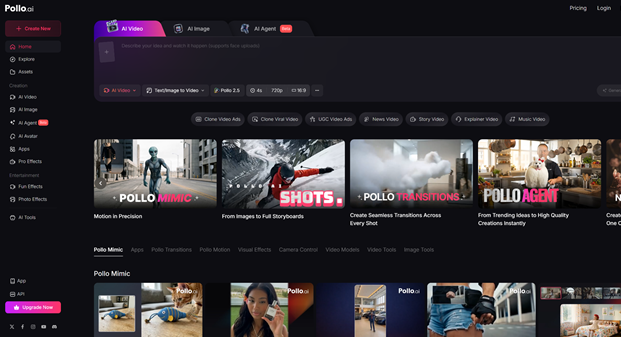
Beyond enhancing existing footage, AI can now generate high-quality video content from text prompts or still images. The motion quality, lighting logic, and cinematic composition that today’s leading models produce would have seemed impossible just two years ago.
If you’re looking for a versatile platform to explore AI video generation, Pollo AI is worth checking out. It brings together some of the most powerful AI video generation models in one place, including tools for text-to-video, image-to-video, and more — all through a clean, accessible interface.
Pollo AI also has a dedicated app, so you can create and manage your AI video projects directly from your phone, which is a genuine convenience for creators who work on the go.
AI Tools for Maintaining Visual Consistency Across Formats
Video doesn’t exist in isolation. Most content strategies involve a mix of video, static images, thumbnails, social graphics, and promotional materials. Keeping all of these visually consistent is just as important as keeping your video footage cohesive, and AI image tools have become essential for exactly that reason.
Three platforms stand out in this space right now.
- Pixlr AI is a browser-based AI photo editor that punches well above its weight. It offers AI-powered background removal, object replacement, generative fill, and smart retouching tools that make professional-grade image editing accessible without a steep learning curve or a hefty subscription fee.
- OpenArt takes a different angle, focusing on AI image generation and creative exploration. It supports a wide range of generative models and offers features like AI canvas, workflow building, and style training that let you develop and maintain a consistent visual aesthetic across everything you produce.
- Canva needs little introduction, but its AI features have expanded significantly and deserve recognition in this context. Magic Studio, Canva’s AI suite, includes text-to-image generation, AI-powered video editing, background removal, and smart resize tools that automatically reformat designs for different platforms.
The Workflow Shift AI Makes Possible
What AI ultimately delivers isn’t just better-looking video. It’s a fundamentally different relationship with the production process. Tasks that used to require specialized skills, color grading, noise reduction, upscaling, and character animation are now accessible to anyone with a decent prompt and the right platform.
This democratization of quality means smaller teams can produce content that competes visually with much larger operations.
More importantly, AI removes the inconsistency that has always been the enemy of brand building through content. When your video looks the same, your characters behave the same, and your visuals carry the same aesthetic identity across every piece of content you publish, audiences recognize and trust your work faster. That recognition compounds over time into real audience loyalty.
Final Thoughts
AI isn’t replacing creative vision, but it’s removing the technical barriers that used to stand between a good idea and a polished final product. Whether you’re enhancing existing footage, generating new video content from scratch, or maintaining visual consistency across a multi-format content strategy, the tools available right now are genuinely powerful and increasingly accessible.
Start with the platforms that fit your immediate workflow needs, experiment freely, and let the technology handle the technical heavy lifting. The creative part is typically the ideas, the storytelling, the brand identity that’s still entirely yours.
















Consistency is the right thing to focus on, and it is worth separating the two very different problems that hide under that word.
The first is consistency within a clip. That is a model behaviour: as a generation gets longer, each frame is reconstructed with reference to the previous ones, so small deviations compound. In practice, you see it in a predictable order. Hands go first, then any legible text on signage or packaging, then background crowds, then fabric and hair. This is why four to six-second segments cut together survive review far more often than one long render. Enhancement passes cannot repair it after the fact, because there is no correct frame to restore toward.
The second is consistency across clips, which is a workflow problem rather than a model one, and it is the one most teams actually lose time to. If the scene description is retyped from memory each week, the lighting, framing, and camera behaviour drift even when nothing about the tool changed. The fix is unglamorous: write the brief in a fixed order, subject, action, setting, lighting, camera behaviour, duration, and save it alongside a note about which model and clip length produced the take you shipped. A seasonal refresh then becomes a diff rather than a new production.
One more thing that changes output quality more than any enhancement step: describe motion, not a still. A brief like a barista, warm light, wooden counter is a photograph, so the model invents movement to fill the gap, usually a slow drift. Rewriting it as: barista slides a cup across the counter, camera holds still, steam catches the window light produces something far more usable from the same tool.
Since models differ a lot on motion strength versus fine detail, running the identical brief through several before committing is the only reliable comparison. I use soralum.com for that step rather than retyping the same paragraph into separate products.
I keep seeing the same quality gap the article describes: a clip looks clean on the desktop preview, then falls apart once it hits a phone feed. Before I post anything I generate, I now check how public stories actually look with a TikTok story viewer (toktoolset.com), so I am not guessing from my own logged-in screen. The consistency advice here is useful; the extra check just saves me from publishing the blurry version.
The consistency notes match what I see in practice. Still frames pulled from upscaled clips often stay a bit soft, so I run those through mejorarcalidad before they go into the deck.
The article covers AI video cleanup. Another image to video ai option is SoraLum. It turns a still photo into a short video.
When reading about Pollo AI, I couldn’t help but think how convenient it is for creators to access powerful AI video generation models right from their phones. With tools like automatic upscaling to 4K and real-time stabilization, the AI Tools Directory is truly a game-changer for video creators. Imagine finishing a polished video on your commute!