 The rise of AI has introduced a new era for digital content creation, with AI image generators emerging as essential tools for designers, marketers, and creatives. These tools simplify the process of generating high-quality images, allowing users to produce visuals that meet specific needs. However, finding a reliable AI image generator that offers consistent output, flexibility, and high-resolution results remains a key consideration.
Flux 2, developed by Black Forest Labs, aims to address these concerns by providing a versatile solution for generating and editing images. With its ability to work with multiple references and deliver accurate results, Flux 2 AI image generator serves a range of applications, from product rendering to creative design. At Flux2.im, users can access the platform to explore Flux 2 free online features and evaluate its suitability for various professional workflows.
What is Flux 2 by Black Forest Labs?
Flux 2 is an advanced AI image generator developed by Black Forest Labs, designed to provide high-resolution and high-quality image creation for both creative professionals and businesses.
Building upon the foundation laid by its predecessor, Flux 1, Flux 2 AI introduces significant improvements in versatility, image consistency, and speed. Unlike many other AI image generators, Flux 2 excels at producing detailed, realistic visuals while maintaining a high level of consistency across multiple variations and edits.
Model Flux 2 Variants for Different Needs
Flux 2 offers various model variants to cater to the specific needs of different users. The FLUX.2 [Pro] model is designed for those who require the highest image quality and speed, with superior prompt adherence and visual fidelity.
FLUX.2 [Flex], on the other hand, provides users with complete control over model parameters, allowing for precise adjustments in layout accuracy and rendering speed. It is especially adept at rendering text and intricate details, making it suitable for tasks that demand precision.
The FLUX.2 [Dev] model is an open-weight version, providing developers with full access to the model’s architecture for integration and customization within various workflows. Finally, FLUX.2 [Klein] is a coming-soon open-source model under the Apache 2.0 license, providing even more flexibility for developers looking to implement AI image generation capabilities into their own applications.
What Sets Flux 2 AI Image Generator Apart?
High-Resolution Image Generation
Flux 2 supports the generation of images with a maximum resolution of up to 4 million pixels, allowing users to produce crisp, detailed visuals suitable for high-end applications such as product photography, e-commerce visuals, and digital content creation.
This high resolution is crucial for industries that demand sharp and precise images, ensuring that every detail is captured without compromising on quality.
Multi-Reference Image Support
A standout feature of Flux 2 is its ability to handle up to 10 reference images simultaneously. This multi-reference capability ensures visual consistency across multiple assets, allowing users to create a cohesive series of images.
Whether for a product line or a character set, Flux 2 guarantees that lighting, style, and overall composition remain uniform, saving time and reducing the need for manual adjustments in post-production.
Improved Prompt Interpretation
One of the strengths of Flux 2 is its advanced ability to interpret complex and structured prompts. The model can process detailed, multi-step instructions with accuracy, enabling it to produce images that meet highly specific requirements.
This level of precision enhances workflow efficiency, especially for users who need to execute sophisticated image generation tasks without going through multiple iterations.
Realistic and Consistent Image Quality
Maintaining consistent image quality is a significant advantage of Flux 2. The model ensures that features such as texture, lighting, and proportions are consistently reproduced across multiple images, making it ideal for creating consistent brand visuals, product mockups, or storytelling assets.
This consistency is crucial for maintaining visual integrity across a range of content, from marketing materials to e-commerce listings.
How to Use Flux 2 AI Image Generator Free Onine
Enter Your Prompt
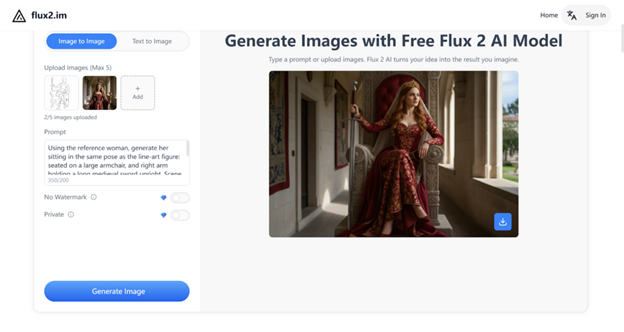
To start using the Flux 2 image generator, type a clear description of what you want to create. Include key details like the subject, mood, lighting, and style.
The Flux 2 AI model processes your input with advanced semantic understanding, converting your instructions into visually coherent and accurate results. The more specific your prompt, the more refined the output will be.
Upload an Image for Editing
If you want to refine or edit an existing image, simply upload it to the Flux 2 platform. You can adjust elements like composition, lighting, and even modify or replace certain aspects, all while maintaining the image’s realism and integrity.
Whether you are enhancing a product image or transforming a scene, Flux 2 AI makes it easy to edit with high precision.
Generate and Iterate
Once your prompt is ready, click the Generate button to create the image instantly. You can then refine the prompt or adjust the creative direction to explore variations.
Flux 2 excels at maintaining consistent visual identity and character integrity across multiple iterations, making it an excellent choice for projects that require storytelling, brand consistency, or design exploration.
Flux 2 vs. Nano Banana Pro: A Quick Comparison for Professional Image Generation
Both Flux 2 by Black Forest Labs and Nano Banana Pro from Google’s Gemini team are modern, production-grade AI image models. Nano Banana Pro currently leads in ultra-accurate in-image text, deep integration with Google’s ecosystem, and enterprise-ready hosted tooling.
By contrast, Flux 2 AI image generator focuses on open-core access, 4MP photorealistic output, and strong multi-reference control that can be self-hosted or integrated into custom pipelines—making it especially attractive for developers, technical teams, and businesses that want more control over their stack.
| Feature / Aspect | Flux 2 (Black Forest Labs) | Nano Banana Pro (Google) |
| Overall Positioning | Professional-grade generator with open-core ecosystem | Hosted model focused on consumer + enterprise Google integrations |
| Image Resolution | Up to ~4MP, optimized for realism and detail | Up to 2K–4K, depending on integration and output settings |
| Text Inside Images | Good, suitable for UI, branding, and product visuals | Generally stronger text accuracy, especially for posters and long text |
| Multi-Reference Support | Built-in multi-reference conditioning for consistent product lines or characters | Limited; most workflows rely on host tools, not native |
| Control & Customization | Flexible control; includes open-weight options for developers | Less customizable; works mainly as a managed service |
| Deployment Options | API, cloud, or self-hosting; also available on Flux2.im | Fully hosted via the Gemini ecosystem |
| Best For | Teams needing customization, consistency, and self-host options | Teams integrated into Google tools, needing strong text output |
Is Flux 2 Worth It for Workflow?
Flux 2, developed by Black Forest Labs, offers an advanced solution for AI-generated images, positioning itself as a versatile tool for both creative professionals and businesses.
Unlike many AI image generators, Flux 2 image generator excels in producing high-resolution, realistic visuals while maintaining consistency across multiple iterations. The platform’s multi-reference image support, ability to interpret complex prompts, and diverse model variants contribute to its growing reputation in the field.
Designed for a wide range of applications, from product photography to digital marketing and UI/UX design, Flux 2 integrates flexibility and speed, making it a viable choice for those looking to streamline their content creation processes.
The platform caters to professionals across various industries by offering different model options like FLUX.2 [Pro] for top-quality results, FLUX.2 [Flex] for precise control, and FLUX.2 [Dev] for developers seeking open-weight access.