
Picture a twenty-second sequence at a fairground. A woman walks up to a carousel holding two paper tickets. Across the ride, the operator slips a brass key out of the control box and drops it into his pocket. With that single, silent gesture, the audience understands she has missed the last ride. Who the second ticket was for can wait until the next scene.
In traditional filmmaking, capturing that insert requires breaking down the camera, moving across the location, and matching the lighting. For mobile filmmakers shooting on a compatible iPhone Pro, the TELESIN Master Grip Kit with 3.5X Telephoto Lens lets you capture tight narrative cutaways from the same camera position, staying on the same side of the fence as your subject.
The bundle drops from $229.99 to $183.99 for Black Friday and Cyber Monday (November 19–30), making it an accessible addition to a mobile kit. Rather than treating an external teleconverter as a novelty, treat it as a dedicated shot on your shot list before you arrive on set. So here’s a shot-list approach to visual storytelling: lens choice, screen direction, exposure, and distance for a telephoto insert on an iPhone Pro.
Shot One: Establish Screen Geography and the 180-Degree Line
Start with a wide establishing frame using the iPhone’s native 1x main camera (24mm equivalent). Your goal is to anchor the spatial relationship between the subject, the gate, and the carousel in a single composition, clearly establishing the 180-degree axis of action.
Pay close attention to screen direction and eyeline vectors. If the operator is positioned on the right third of the frame, the woman’s eyeline must track toward screen right when she looks for him. Locking in that spatial geography in the master shot gives you editorial freedom later: once the audience understands the space, you can cut to tighter focal lengths without disorienting the viewer.
Shot Two: Motivate the Cut on a Medium Focal Length
Hold on the actor at the exact moment the carousel music cuts out. Allow her reaction and eyeline shift to register on screen before making the edit (in narrative editing); the glance is what motivates the cutaway.
Switch to a medium shot (using the native 2x crop or 3x/5x telephoto lens, depending on your iPhone Pro model and blocking) to tighten the frame. This focal length compresses the background just enough to isolate her micro-expressions while keeping you physically close enough to give quiet, low-volume direction between takes.
Frame the shot so the two tickets remain visible in the lower third; as a visual prop, they anchor the scene’s stakes and explain why the sudden silence matters to her.
Shot Three: Isolate the Narrative Detail at 3.5X Magnification
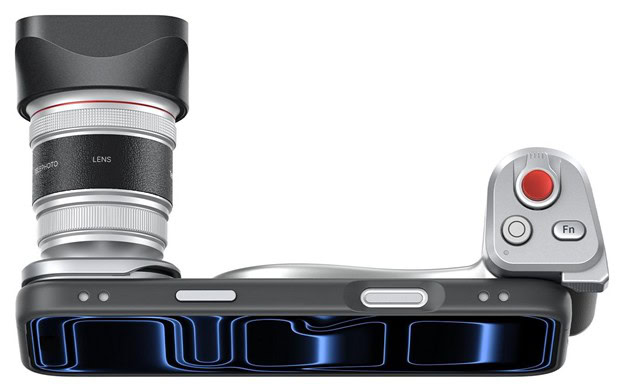
To capture the brass key, mount the TELESIN 3.5X optical converter over the iPhone’s native telephoto lens and select the matching optical profile inside the ReefColor app to ensure proper lens alignment, distortion correction, and manual exposure lock. Because high-magnification teleconverters have a long minimum focusing distance (MFD), TELESIN’s optical guide recommends keeping more than eight meters between the sensor and the subject to achieve sharp focus.
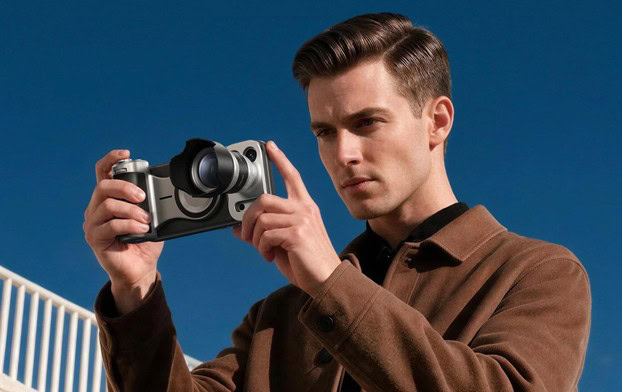
At this extended focal length, micro-jitters are amplified, making the Master Grip’s dual-handed ergonomics and physical shutter button essential for frame stability. Pre-frame the operator’s hand before it reaches the control box lock so the action enters a steady composition. Crucially, let the camera roll for three to five seconds after the key disappears into his pocket. Those extra handles give you clean pacing options in the timeline when deciding when to cut back to the actor’s reaction.
Test the sequence with the sound off
When reviewing your sequence in post-production, mute the audio track and watch the three shots cut together. If the narrative beat reads clearly through visual continuity alone (wide geography, motivated eyeline, and compressed telephoto detail), the cutaway has earned its place in the sequence.
If the brass key gets lost against the dark fabric of the operator’s jacket, adjust your camera angle slightly so the metal catches a specular highlight from the fairground lights. A small shift in lighting angle and focal compression can do the heavy lifting of an entire line of dialogue.
The 3.5X package is also listed on Amazon as part of the $46 promotion. For your next shoot, take an ordinary action from your script, lock in your focal lengths, and circle the single visual detail that lets the audience understand the scene with the sound turned all the way down.