

We decided to come up with a complete DIY guide for installing or setting up a satellite dish & decoder for DSTV, MyTV, Multi TV & etcetera by following after a simple tut.
This idea was birthed after we recently installed one for a student who complained of having not even half our installation fees. We concluded that a guide like this can help a lot of persons install their satellite dishes without a bug of any kind.
Following this guide step by step will help you install and set up your satellite Tv dishes without the usual missing channels, poor signal, and related issues that happen as a result of low technical know-how for installing satellite dishes.
We strongly advise you to ignore this if you have a phobia of learning new stuff or not a big fan of do-it-yourself (DIY) guides. It can come in handy for new installations, adjusting dish positions, or when relocating to a remote area.
Tools Needed
- The Satellite dish and components (ie. Reflector, Lnbf, and Decoder. They are usually sold together).
- A good hammer.
- 4 Pieces of 3-inches nail
- I packet of cable clips (the one with nails)
- 10/13, and 14/15 combination, flat or ring spanner(s)
- A cutter (or electric pliers)
- A Black Solution Tape (sellotape).
- A Screwdriver
- F connectors (a minimum of 2) and Coaxial cables (1 full roll of Coaxial cable is about NGN1,000, $9)
- A 4663x or 4669x Strong decoder (special digital satellite signal meters for installation can come in handy for this, but we used a strong decoder and so will be using it for references throughout this tutorial). You can buy cheap digital satellite signal finding meters online. Either from here, here, or any of the top online shopping malls with reputable sellers.
Extra Tools
This part is necessary if you are going to use a pipe and not the house roof, wall, or wooden fetcher board before the roof.
The pipe must be fixed on an open space without trees and/or other hindrances. Below is the tools necessary for mounting your satellite dish in an open space outside the building or with a longer pipe.
- A cup of Cement mixed with stones
- a trowel
- Cutlass or shovel (for digging of the hole)
- A paint of sand and a bucket of water
How to Setup the Satellite Dish
The satellite dish components will usually come in separate parts and must be arranged in such a way that makes it easy to receive signals and withstand strong wind.
The arrangement of the dish components depends on where you intend to mount it. If you are going to mount it on a root, wall, or wooden fetcher board of the building, look at the image below for how it should be coupled.
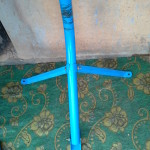
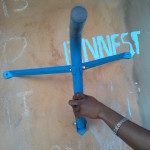
If you intend to mount it on a pipe outside the building, look at the image below and use the tools listed in the extra tools section above to make it solid and well-grounded.
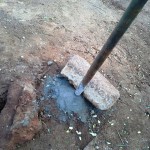
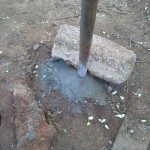
The last thing needed to complete this section is to fit in the screws and nuts in the reflector’s (dish) rear and connect the LNBF accordingly. See the images below for the tips.
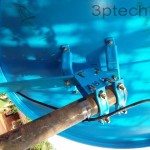
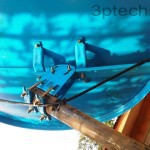
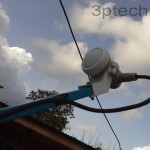
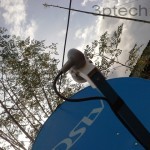
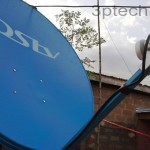
After mounting your satellite dish correctly, you can safely move ahead to the next and final steps covered below.
Related Tips:
How to Configure the Decoder, Activate smart card and free-to-air channels for first viewing
This is the part where your digital satellite signal meter will come into play. Plug the Coaxial cable into the Lnbf base of the main dish assembly and then plug the other end of the cable into the LNB in (Antenna) port in the back of a digital satellite signal meter or a strong decoder.
Complete the second part also known as dish alignment by locating east, west, points, and degrees depending on the satellite tv provider you intend doing the setup for.
Do note that for this tutorial, we used a strong decoder (as a digital satellite signal meter) to install a DSTV satellite dish and then connected the lnbf cable to the DSTV decoder to watch all the channels available for our selected plan.
The angular position, polarity, and transponder frequency values for the popular satellite TV providers are listed below for your learning.
Orbital Position & Frequencies of Popular Digital Satellite TV Providers
For Multi TV (Joy TV): Use –
- TURK SAT
- Orbital Position – EAST
- Transponder Frequency: 12553, 12525, or 12522
- Symbol rate: 19531, 27500, or 27000
- Polarity: Vertical
OR
- Astra2F
- Orbital Position: 28.2°, 28.5°, or 26° East
- Transponder Frequency: 11595
- Symbol Rate: 30000
- Polarity: Horizontal
- Dish Size: 1m or 100cm dish
For DSTV: Hereunder is what to use for DSTV transponder frequency and symbol rate. Simply Use –
- EUTEL SAT W4 or Eutelsat W7
- Orbital Position – EAST (@ 36 degrees)
- Transponder Frequency: 11842, or 12245, 11728, 12284, 11900, or 11747
- Symbol rate: 27500
- Polarity: Horizontal
Note that this particular setting works for High TV, Train TV & most other sports channels satellite providers.
For My TV: Use –
- INTEL SAT, 7.10/K
- Orbital Position – West
- Transponder Frequency: 10986
- Symbol rate: 26657
- Polarity: Vertical
For CanalSat Afrique: Use –
- Orbital Position – EAST
- Transponder Frequency: 12722
- Symbol rate: 30000
- Polarity: Vertical
For HotBird: Use –
- Orbital Position – EAST
- Transponder Frequency: 11881
- Symbol rate: 27500
- Polarity: Vertical
For Nile SAT: Use –
- Orbital Position – West
- Transponder Frequency: 10.990 or 10.993 or 12.130
- Symbol rate: 27500
- Polarity: Vertical
Scanning for Satellite TV Channels & Completing the Setup
This is the last step for installing a satellite dish yourself: Once the polarity, orbital position, and transponder values for your chosen satellite provider is noted, move on to this step to complete the channels scan and full activation.
From your strong decoder remote control, find Menu and then select installation. Enter 0000 as the password and Select manual scanning and then enter your satellite provider’s values as listed above Eg. Eutelsat w4/7, transponder frequency, symbol rate, and the rest.
For Dstv we did the setup as follows:
- We selected Eutelsat w4/7
- Under frequency, we put 12245
- Under symbol rate, we put 27500
- Under polarisation, we put H
At this point, the signal power and the quality meter will start reading, start rotating your reflector (dish) up/down and sideways around 36 degrees east (see your neighbors own for tips or read directly from your digital satellite signal meter).
Watch the signal power and quality and tight the dish strongly once you are able to get values higher than 60% (We got 89% for ours). Once a good signal quality is ascertained, your satellite dish is all setup.
Disconnect the LNB-in from your strong decoder (or digital satellite meter) and connect it to the DSTV decoder. Select English from the language options, E36A-B from the next window, and Universal for LNB type. Hit scan to install and complete the channel setup.
Note: If you are using a digital signal meter, the scan option won’t be necessary. All you need to do is: Connect the LNB-in to the meter and enter the frequency, polarization, and symbol rate values while aligning the dish for the best signal quality.
DSTV Free-to-air Channels
Once your DSTV satellite dish is installed correctly, the following channels will show in clear qualities as they are free-to-air channels for all DSTV satellite dish owners.
- Channel 100
- Channel 198
- Channel 409
- Channel 447
- Channel 449
How to activate a DSTV Smart Card for First Use
If you are activating your DSTV smart card for the first time, you will need to buy a subscription plan. All DSTV bouquets are listed here.
Insert your smart card and take note of the smart card number. Call 012703232 or 08039003788 to set up your account or dial *288# to follow the USSD prompt.
What if there’s the E16 Error Code?
This is a very common error with activating new accounts, you can correct this error if, after 30 minutes of activation, your subscribed (premium) channels are yet to show up.
You can correct the E16 error by sending reset plus your smartcard number (eg. reset 1234567890) as an SMS to 30333 or by using the clear error code – E16 option on the self-service section of the DSTV website.
DSTV Satellite Dish Signal Troubleshooting Tips
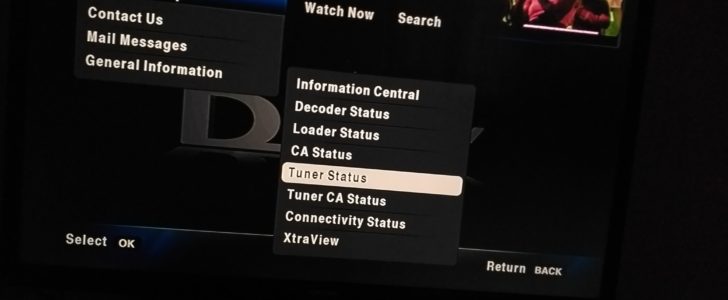
This is an important update for those asking for help on how to properly position their satellite dishes after relocating from their old residence and/or when the dish position gets tampered with by kids playing within the surroundings.
This section would also come in handy for those experiencing very poor reception, distorted audio, and poor visual rendition.
Here, you won’t be needing a digital meter or strong decoder as the built-in signal tuner function that comes with DSTV satellite dish decoders will suffice.
What you need to do is this-
- Position your TV in such a way that- it can be viewed clearly while turning the satellite dish. You’ll need to take it outside in most cases or ask someone else to look at the TV and give you updates while you play around with the satellite dish positioning to various angles.
- Turn on the entire system and press the Help button on your remote control.
- Scroll down to general information and then Tunar Status to your right.
- Click the Tuner status and use that to set up your satellite dish for the best delivery. Anything between 60 and 98 is perfect and would be hardly disturbed by rain and/or poor weather.
Here’s a short video to help you locate this menu option with ease.
Bonus Tip
How to Record TV Shows, FM Radio and Satellite Programs
DSTV Explora hardware and some other premium satellite TV decoders let you record events and programs for future viewing, but if you are using the HD version that doesn’t give such privileges, you can use this section for tips on how to record TV programs for future viewing.
- Select the device to use (for this guide, I’ll be using a PC. Note that there are such enhancement for smartphone and tablet devices)
- Get a USB TV tuner box/stick (assuming you don’t have one already). You can buy it from Amazon INC. by following this link or from their listing page here. There are cheaper models of USB TV tuner stick on Aliexpress too, you can buy one of those from this page. (Note that older desktop computers use the PCI component for TV tuning, there’s likely the chance that yours has one already for second-hand buys).
- Connect the USB TV stick to your PC and then, connect the RCA from the decoder to it or use the RF-out to sync between your regular TV and USB TV card.
- Install the USB TV box software and support drivers.
- Select any channel of your choice and hit record to save for future viewing. You can record FM stations and similar programs as long as they work on your PC.
Note: You can record both satellite TV programs and regular TV shows with this guide. You can also use your regular TV cards (for desktop computers) to record live TV shows by upgrading the support software to their latest version.
Your Turn
Looking for a DSTV installation guide PDF? You can get a PDF version of this Satellite TV installation tutorial by clicking here. This will make it super easy for you to look through it when offline.
We ask that you share this page with your Nigerian, Ghanaian, South African, or Kenyan friends that are big fans of DIY Sat TV tutorials. We are opened to technical questions on satellite TV installation, suggestions, or more tips on troubleshooting satellite TV networks.



Good morning obasi miracle.am new here and have seen you good towards many people may God bless you.please just want to know apart from myTV, joytv and mbc is there any FTA satellite?
Is there any effect to signal quality if i Pass DSTV signal cable through a socket outlet conduit pipe with live socket cable
If there’s any WhatsApp group where installers have created to share more idea kindly add me up +2332/441/54343
Is there any chance you can track dstv frequency on fta decoder and watch live matches?Can someone please help me Arab sat frequency
Pls Obasi add me up WhatsApp +23481/2016/2221
Thanks brother
Obasi the great, I’d appreciate your concerns toward fellow friends. Can you please send me tutorials PDF to this mail?
pete?r.msh/[email protected]
Pls Mr obasi miracle, add me on your whats’app page I need your help.
Obasi this is good and a well calculated approach towards being of help to mankind. Please i need a pdf file of this info sent to my email [email protected]
I want to connect two satellite dish to one decoder with the correct configuration. How can I go about it? Nile sate and multi-tv. thanks
I just buy DStv decoder, how can I activate it for the first time, through online?
Thanks for your help
Pls i am using digicom at edo state all my channels left few days ago and refuse coming back i positioned my decoder to the west using nilesat formely
Sincerely am very much impressed with this satellite TV tutorial and wishes to State categorically that I have added a new experience to my old experiences.
Thank you for the enlightenment, we hope to receive more from you, sir.
Sir I already have my Strong Decoder active and working fine , but for 2 years now in have not been using it because my television got bad I just did fix up I did on the Decoder I found all the television stations that I have watching but the stations don’t have signals and nothing coming up even the radio stations too……
Hello,
Please, I’m in Togo, and we would like to instal healing Jesus TV on our decoder, but it doesn’t work. How can we get it here in Togo?
hi obasi! how can I activate my DStv decorder I’ve not used for years?
Are the connections still intact? All you’d need to do is – subscribe normally and wait for about an hour. If it doesn’t come up, do a quick reset with the *288*2# DSTV USSD code or ring their customer support to reset it from their end quickly.
hi Obasi! have not used my DStv decorder for some time now, what will do to activate it before subscription?
Select Dstv satellite
Good day sir.
Please add me to your what’s app group I need help on how to configure my decoder to watch football matches . My wahtsapp no:0/80-509/343/66. Thanks
Mr miracle God bless you so much for the wonderful work you are doing for learners like me. I’ve not seen an article like yours, keep it up. I need the pdf. And also add me to your WhatsApp group. 0803/55528/65.God bless you
Hello,
Pls does anyone have info on how to install/activate POWERSAT 999SM
Please I want to set strong and there is an inscription on the screen (invalide smart card) what do I do please.
Thanks a lot, I am going to try this soon. Please, what is the satellite frequency to track starting?
I have a s2/t2 decoder and I managed to search for channels which it worked but my question is, can I use it as satellite finder or meter since I don’t have satellite finder or a strong decoder? Please I with to have it’s answer please it’s needed or u can email me with the PDF to if u don’t mind please. kedes?ki.al/[email protected] thanks
Hi the big house I need a great help from any person who can assist me I want to track MBC and which satellite will I get it and tstv too the longitude no and frequency sbm
Pls Miracle, I would be u could help me with PDF guide and add me to ur WhatsApp group 0248/937/151 Ghana.
thanks
Please I need your assistance on how to search and get free to air channels on the satellite through Trendcorp (CTL) Decorder.
I will so much appreciate your feedback.
Thanks.
Please l have difficulty in getting signal, they even say the signal is poor. I want to install it too, please help me or send me the process to me on 0247649654 please .im in Ghana
Obasi, thanks, it educating!
Please, I have difficulty getting strong signal on Strong Decoder, please send me the Set up settings or any other use ful information. Thanks. [email protected], or WhatsApp 08038405865.
Thanks bro u are the best
if my Dstv is righting pg blocked, what happened please
Plis send me a pdf how to set a dish both c band and ku vand
Please do send the PDF manual on how to install a TV satellite dish to this email Taiwona//[email protected]
Please help me out Biko Obasi. I’ve been trying to track my consat
But to no avail, please help me with what satlite am to use, frequency, polarization and symbol rate. Etc.
I’ve been using eutelsat w4 and frequency 12593, H, and symb rate as 30000. It’s not working
Thanks.
Good p.m Obasi pls i need the frequency and the symbol rate for STAR TIME. Thanks, from Delta state.
Hi Godswill,
Use 11862 (H) 27500 and the dish should be nearly facing the sky and at the same time facing west-like slightly. You can change polarity to (V) if H doesn’t work. I am not to sure of the polarity right now, but the symbol rate and freq. is it.
Your tips is very helpful please kindly send me all tips I need to know, I want to take this even as profession, I’m a corper no job. Thanks in anticipation. My mail is… francisbabat//[email protected]
Kindly send d PDF pls to this email
Hi Silas,
see the updated section for link to download the satellite TV installation tutorial in PDF
Please send me the PDF of the tutorial guide on strong installation
Thanks so much bro. More grease to your elbows. Please can you send me the PDF file to my email. Thanks
You can download the PDF file directly. It has been added to that section
am grateful to you sir, but i still think i need a pdf file to be able to read understand it very clearly sir.
You can download it from the updated section of this publication.
Please can you send the PDF format of how to install a satellite network dish?
This is sent as requested Sam.
Plz can I get a PDF tutorial on how to install and search for free satellite TV station on my tv?
Gone through your tut may you please send me a PDF for reference.
Hi Charles,
The PDF tutorial on how to install satellite TV has been sent as requested.
Thanks
I stayed up almost all night lookin for answers to some challenges with my strong decoder. U can’t imagine my joy when I came across ur page! Thank u so much! Please can I also get the free PDF Sir? [email protected]
please send me the tutorial PDF Format. 08033638097 or arism//[email protected]
Hi Ariyo,
This is sent to the email address provided.
Good day sir MIRACLE OBASI, Hmmm, I am very pleased to acquire, inculcate and absorbed into my medulla oblongata your public wisdom and knowledge, you have really expose me to what I have desired to learn 🙌. Please send to me the PDF tutorial to my email,. miracle/[email protected]
Bro. I love what you are doing here, can I have the PDF version sent to my mail? You are the best, God bless you! [email protected]
Thank you so much Obasi. this is really good of you to share. kindly send me the PDF. my email is ericsmaji(at)gmail.com my WhatsApp: 7030/832083.
thanks
God bless you.
Thanks for the lesson… Please forward the PDF copy to my email……
Remain blessed
The Free PDF tutorial has been sent as requested. Do enjoy the rest of your day Tim
Please can we WhatsApp on +233570465450
Obasi please what if u want to installe Ster Times ?my question can u use strong decoder to set it up your channels
Thanks a lot to Engr. Obasi Miracle.. Actually this write up has helped me a lot in improving the little knowledge I had about satellite installation.. Really appreciate this, God will continue to bless your efforts and I also look forward to becoming a better professional in this field through your assistance.. Thank you and God bless..
Thanks for the great work you doing sir, please send me a PDF copy. Thankyou
This has been shared with you bro.
good job bro.am around msa Kenya,I install zuku dstv n star time dishes. u can call me.0722948390.thanks.
Please send me the guide.08033145194
Tnx 4 dis free tutorial… Plz sir I need d pdf… & also to add 2 ur group.
Sir Obasi, Thanks for this wonderful guide, can I plz be add to your Whatsapp Training group and also get link to the PDF copy. Thanks. Here is my email and phone number respectively [email protected] and 08109086573.
You can subscribe to our list for regular updates. The PDF copy has been sent to your email address. Regards
Thanks so much Mr. Obadiah. PLS I need the PDF. And I will be glad if you can add me to ur whatsapp group for more tutorial. 07037437772 Thanks once again
Hi Samuel,
The guide has been sent to the email address provided.
pls how can i get to if knew new channels are out pls
Good evening Mr Obasi, thanks for this post sir, pls I need the PDF of this tutorial and I will be glad if u can add me up on your whatsapp training forum with this number. 07030341983. Thanks
Pls which dish size i can use to get yahsat 1A @52.5 in lagos?
yes i need it
Am happy to see this pcs I will soon try it Thanks oh ask I need the pdf please thanks
The PDF copy is sent to your email address as well.
pls i need pdf copy of this document
Hi Michael,
I have sent the PDF tutorial download link to your email address.
Regards
Obasi,God blessed you,pls forward the pdf to my email ????,I will be very grateful.
How about hotbird using magic box
A new dstv was sent to me and am in a remote village and can’t find an installer nearby, please are the procedure I need to follow to install it myself.
You are Icezak.
You can use these tips after going through them carefully.
Please my dish just lost signal can I get the right LNB frequency for my tv
Hi Mercy,
That’s provided in the MYTV section of this post.
I have got multchoice south Africa I would like to use it in Uganda viewing south African channels and i tried to install the dish and the signal is good but it only shows 1 channel so what should i change to enable it to show all channels…..Thanks
Pls how do I track MBC
Gr8 Installer’s installation techniques. Please, what is the total cost of installation of a unit of DSTV components in our local domain here in Lekki?
Hi Duncan, You can order for Multi-choice DSTV kits online from https://3ptechi.es/2A8i30z
can you please help me in clearing my E16 error am in ghana have tried d selfservice but is not working out. plesase this my smartcard nomba 1050487787 am using nigeria dstv
please ,hw can i use .the signal finder ,to track satelites channels
They come with digital screen that will let you monitor the signal strength while tracking.
bro how you doing,can i ask a very onfidential question via any othe platform
send via the contact page of our website. Regards
Sir it as been one year have not been able 2 use my startime digital satellite till now know one can instor it 4 me pls help me
What’s your physical location Bode?
Obasi miracle, indeed your name speaks louder about you. You are really doing a wonderful job. Have you heard about Tstv? They are going to lunch it on October 1st, will like to hear your view.
Nothing tangible about TsTV from my end Ola,
Thanks for dropping by.
Dis ur page is quite awesome with d information u gave out here, thanks a lot. Pls… I want to buy a digital signal meter but a bit confused about d model to buy. Pls help me out sirs…
You intends buying online or from local shops?
Please Boss David can you help out with Ctl setup? I have done the installation and on manual scan i got strength of 72% and quality 97%. Still on auto scan no channel is found. Please i will really appreciate your support.
Please I can’t also see eutelsat W4 or 7 in my Satellite list on my strong decoder srt 49621.
What’s my next option?
Not. I want to set up the dish as well as connect the decoders.
David
Please I just bought dstv, can the same frequency in your tutorial be used? And it’s an Xtra View so how do I go about it?
Thank you.
Is this already installed (as in mounted for use)?
Hi may God grant u long life to continue helping pple. Very few pple wil do this for free. Can these settings b used in other countries such as Kenya?.
You can use this template for setup Patrick. Satellite networks are the same everywhere once receptivity is possible.
Thanks.
This is a well defined and straight to the point DIY write up, you’re indeed a genius.
However, am a bit lost on tge aspect if recording via USB TV stick. Pls if ok, kindly help with a comprehensive explanation. I use both Explora 2 and HD zapper.
Thanks
Hi Olakunle,
This part is very simple. It is meant for those interested in viewing the satellite stations from their PCs. Most tech stores sells devices popularly known as “TV card (for tower desktops) and/or USB TV box”. Once you have installed the device to your PC, you can record TV programs and radio station updates from TV on PC player interface.
Sir, I wish to know the best frequency and symbol rate to trap mytv.
Please any idea on how to set up a MMDS antenna
Please any code for breaking the dstv sports and movie channels
Please how I connect two satellite dish to one strong decoder?Help me please!!
what is DSTV frequence number and symbol rate number
This is specified in the article already Ogunfuyi
I just abadon my consat dish because of the frustration of not getting any channel pls can you give me any info on it. Thanks
Hi Obasi, I have been having the fear of using a Qsat decoder. How can I use it to watch FTA channels such Dove Tv, RTM, New frontiers and the likes.
Thanks .
Thanks for the tutorials. I really like it even though I paid someone to set mine for me just a week ago.
Do u sell the satellite signal meter? And how do u read it.
Thanks
You can buy from Aliexpress and the reading is as strait-forward as similar tech gadgets
thank you bros I really enjoy dis post God bless u…but can someone use dstv decoder for tracking signal during dstv installation???
Yes you can
thank for the tutorial may God bless you and continue to enrich your knowledge
Thanks for dropping by and for your kind wishes Ayofe
Great stuff man. You can also check out alliance tech for all your DStv installations.
I will be happy to read from you soon.
Thank you sir
What’s your current location?
Kudos to you,Engr Obasi Miracle.
in fact I am so much impressed about your tutor here.
However, I need so much to know about the satellites possibly all birds, their
*Satellites name:
* Degree’s,
* Transponder frequencies,
*Symbols rate
*Polarisation
*lnbf position
All pending on the birds.
Sir I need your help, I wills much glad if you can add me up on whatsapp via; 08165314829.
May God bless you as you do so.
I am in Nigeria
What about quality decoder
Pls sir how do i install mytv channel on my dstv decoder strong 4996
thanks 4 this valuable ideas
great
Pls also give me your phone number
Obasi gud morning, pls give me frequency for top nigeria movies for multi-tv
can someone assist me please????
A technician install startime dish for me using strong modem to get his signal. after obtaining 82 % on the average, he connected it back to the startime decoder but kept showing EO1 no signal. Kindly assist please